前言
一般我们用bootstrap呐,都是用的从官网或github下载下来build好了的版本,千人一脸呐多没意思。当然,官网也给我们提供了自定义的工具,如下图所示,但每次要改些什么就要重新在官网上打包一份,而且还是个国外的网站,甭提有多烦躁了。
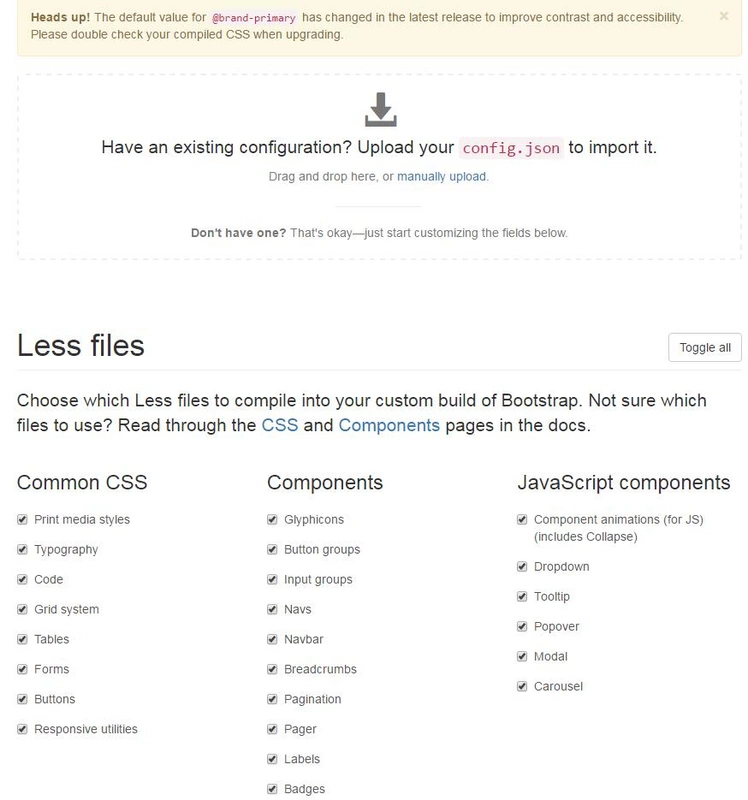
那么,有没有办法让我们随时随地都能根据业务的需要来自定义bootstrap呢?答案自然是肯定的,webpack有啥干不了的呀(大误)[手动滑稽]
sass/less的两套方案
bootstrap主要由两部分组成:样式和jQuery插件。这里要说的是样式,bootstrap有less的方案,也有sass的方案,因此,也存在两个loader分别对应这两套方案:less <=> bootstrap-webpack 和 sass <=> bootstrap-loader 。
我个人惯用的是less,因此本文以bootstrap-webpack为例来介绍如何打造一个自定义的bootstrap。
开工了!
先引入全局的jQuery
众所周知,bootstrap这货指明是要全局的jQuery的,甭以为现在用webpack打包的就有什么突破了。引入全局jQuery的方法请看我之前的这篇文章《webpack多页应用架构系列(四):老式jQuery插件还不能丢,怎么兼容?》(ProvidePlugin + expose-loader),我的脚手架项目Array-Huang/webpack-seed也是使用的这套方案。
如何加载bootstrap配置?
bootstrap-webpack提供一个默认选配下的bootstrap,不过默认的我要你何用(摔
好,言归正题,我们首先需要新建两个配置文件bootstrap.config.js和bootstrap.config.less,并将这俩文件放在同一级目录下(像我就把业务代码里用到的config全部丢到同一个目录里了哈哈哈)。
因为每个页面都需要,也只需要引用一次,因此我们可以找个每个页面都会加载的公共模块(用Array-Huang/webpack-seed来举例就是src/public-resource/logic/common.page.js,我每个页面都会加载这个js模块)来加载bootstrap:
require('!!bootstrap-webpack!bootstrapConfig'); // bootstrapConfig是我在webpack配置文件中设好的alias,不设的话这里就填实际的路径就好了上文已经说到,bootstrap-webpack其实就是一个webpack的loader,所以这里是用loader的语法。需要注意的是,如果你在webpack配置文件中针对js文件设置了loader(比如说babel),那么在加载bootstrap-webpack的时候请在最前面加个!!,表示这个require语句忽略webpack配置文件中所有loader的配置,还有其它的用法,看自己需要哈:
adding ! to a request will disable configured preLoaders
adding !! to a request will disable all loaders specified in the configuration
adding -! to a request will disable configured preLoaders and loaders but not the postLoaders
如何配置bootstrap?
上文提到有两个配置文件,bootstrap.config.js和bootstrap.config.less,显然,它们的作用是不一样的。
bootstrap.config.js
bootstrap.config.js的作用就是配置需要加载哪些组件的样式和哪些jQuery插件,可配置的内容跟官网是一致的,官方给出这样的例子:
module.exports = {
  scripts: {
    // add every bootstrap script you need
    'transition': true
  },
  styles: {
    // add every bootstrap style you need
    "mixins": true,

    "normalize": true,
    "print": true,

    "scaffolding": true,
    "type": true,
  }
};
当时我是一下子懵逼了,就这么几个?完整的例子/文档在哪里?后来终于被我找到默认的配置了,直接拿过来在上面改改就能用了:
var ExtractTextPlugin = require('extract-text-webpack-plugin');
module.exports = {
  styleLoader: ExtractTextPlugin.extract('css?minimize&-autoprefixer!postcss!less'),
  scripts: {
    transition: true,
    alert: true,
    button: true,
    carousel: true,
    collapse: true,
    dropdown: true,
    modal: true,
    tooltip: true,
    popover: true,
    scrollspy: true,
    tab: true,
    affix: true,
  },
  styles: {
    mixins: true,

    normalize: true,
    print: true,

    scaffolding: true,
    type: true,
    code: true,
    grid: true,
    tables: true,
    forms: true,
    buttons: true,

    'component-animations': true,
    glyphicons: false,
    dropdowns: true,
    'button-groups': true,
    'input-groups': true,
    navs: true,
    navbar: true,
    breadcrumbs: true,
    pagination: true,
    pager: true,
    labels: true,
    badges: true,
    jumbotron: true,
    thumbnails: true,
    alerts: true,
    'progress-bars': true,
    media: true,
    'list-group': true,
    panels: true,
    wells: true,
    close: true,

    modals: true,
    tooltip: true,
    popovers: true,
    carousel: true,

    utilities: true,
    'responsive-utilities': true,
  },
};这里的scripts项就是jQuery插件了,而styles项则是样式,可以分别对照着bootstrap英文版文档来查看。
需要解释的是styleLoader项,这表示用什么loader来加载bootstrap的样式,相当于webpack配置文件中针对.less文件的loader配置项吧,这里我也是直接从webpack配置文件里抄过来的。
另外,由于我使用了iconfont作为图标的解决方案,因此就去掉了glyphicons;如果你要使用glyphicons的话,请务必在webpack配置中设置好针对各类字体文件的loader配置,否则可是会报错的哦。
bootstrap.config.less
bootstrap.config.less配置的是less变量,bootstarp官网上也有相同的配置,这里就不多做解释了,直接放个官方例子:
@font-size-base: 24px;
@btn-default-color: #444;
@btn-default-bg: #eee;
需要注意的是,我一开始只用了bootstrap.config.js而没建bootstrap.config.less,结果发现报错了,还来建了个空的bootstrap.config.less就编译成功了,因此,无论你有没有配置less变量的需要,都请新建一个bootstrap.config.less。
总结
至此,一个可自定义的bootstrap就出炉了,你想怎么折腾都行了,什么不用的插件不用的样式,统统给它去掉,把体积减到最小,哈哈哈。
后话
此方案有个缺点:此方案相当于每次编译项目时都把整个bootstrap编译一遍,而bootstrap是一个庞大的库,每次编译都会耗费不少的时间,如果只是编译一次也就算了,每次都要耗这时间那可真恶心呢。所以,我打算折腾一下看能不能有所改进,在这里先记录下原始的方案,后面如果真能改进会继续写文的了哈。
示例代码
诸位看本系列文章,搭配我在Github上的脚手架项目食用更佳哦(笑):Array-Huang/webpack-seed(https://github.com/Array-Huang/webpack-seed)。
前言
一般我们用bootstrap呐,都是用的从官网或github下载下来build好了的版本,千人一脸呐多没意思。当然,官网也给我们提供了自定义的工具,如下图所示,但每次要改些什么就要重新在官网上打包一份,而且还是个国外的网站,甭提有多烦躁了。
那么,有没有办法让我们随时随地都能根据业务的需要来自定义bootstrap呢?答案自然是肯定的,webpack有啥干不了的呀(大误)[手动滑稽]
sass/less的两套方案
bootstrap主要由两部分组成:样式和jQuery插件。这里要说的是样式,bootstrap有less的方案,也有sass的方案,因此,也存在两个loader分别对应这两套方案:less <=> bootstrap-webpack 和 sass <=> bootstrap-loader 。
我个人惯用的是less,因此本文以
bootstrap-webpack为例来介绍如何打造一个自定义的bootstrap。开工了!
先引入全局的jQuery
众所周知,bootstrap这货指明是要全局的jQuery的,甭以为现在用webpack打包的就有什么突破了。引入全局jQuery的方法请看我之前的这篇文章《webpack多页应用架构系列(四):老式jQuery插件还不能丢,怎么兼容?》(
ProvidePlugin+expose-loader),我的脚手架项目Array-Huang/webpack-seed也是使用的这套方案。如何加载bootstrap配置?
bootstrap-webpack提供一个默认选配下的bootstrap,不过默认的我要你何用(摔
好,言归正题,我们首先需要新建两个配置文件
bootstrap.config.js和bootstrap.config.less,并将这俩文件放在同一级目录下(像我就把业务代码里用到的config全部丢到同一个目录里了哈哈哈)。因为每个页面都需要,也只需要引用一次,因此我们可以找个每个页面都会加载的公共模块(用Array-Huang/webpack-seed来举例就是
src/public-resource/logic/common.page.js,我每个页面都会加载这个js模块)来加载bootstrap:上文已经说到,bootstrap-webpack其实就是一个webpack的loader,所以这里是用loader的语法。需要注意的是,如果你在webpack配置文件中针对js文件设置了loader(比如说babel),那么在加载bootstrap-webpack的时候请在最前面加个
!!,表示这个require语句忽略webpack配置文件中所有loader的配置,还有其它的用法,看自己需要哈:如何配置bootstrap?
上文提到有两个配置文件,
bootstrap.config.js和bootstrap.config.less,显然,它们的作用是不一样的。bootstrap.config.jsbootstrap.config.js的作用就是配置需要加载哪些组件的样式和哪些jQuery插件,可配置的内容跟官网是一致的,官方给出这样的例子:当时我是一下子懵逼了,就这么几个?完整的例子/文档在哪里?后来终于被我找到默认的配置了,直接拿过来在上面改改就能用了:
这里的
scripts项就是jQuery插件了,而styles项则是样式,可以分别对照着bootstrap英文版文档来查看。需要解释的是
styleLoader项,这表示用什么loader来加载bootstrap的样式,相当于webpack配置文件中针对.less文件的loader配置项吧,这里我也是直接从webpack配置文件里抄过来的。另外,由于我使用了iconfont作为图标的解决方案,因此就去掉了
glyphicons;如果你要使用glyphicons的话,请务必在webpack配置中设置好针对各类字体文件的loader配置,否则可是会报错的哦。bootstrap.config.lessbootstrap.config.less配置的是less变量,bootstarp官网上也有相同的配置,这里就不多做解释了,直接放个官方例子:需要注意的是,我一开始只用了
bootstrap.config.js而没建bootstrap.config.less,结果发现报错了,还来建了个空的bootstrap.config.less就编译成功了,因此,无论你有没有配置less变量的需要,都请新建一个bootstrap.config.less。总结
至此,一个可自定义的bootstrap就出炉了,你想怎么折腾都行了,什么不用的插件不用的样式,统统给它去掉,把体积减到最小,哈哈哈。
后话
此方案有个缺点:此方案相当于每次编译项目时都把整个bootstrap编译一遍,而bootstrap是一个庞大的库,每次编译都会耗费不少的时间,如果只是编译一次也就算了,每次都要耗这时间那可真恶心呢。所以,我打算折腾一下看能不能有所改进,在这里先记录下原始的方案,后面如果真能改进会继续写文的了哈。
示例代码
诸位看本系列文章,搭配我在Github上的脚手架项目食用更佳哦(笑):Array-Huang/webpack-seed(
https://github.com/Array-Huang/webpack-seed)。