- 减少左右移动鼠标浪费时间,将光标移动速率和移动前延迟改为 最快和最短
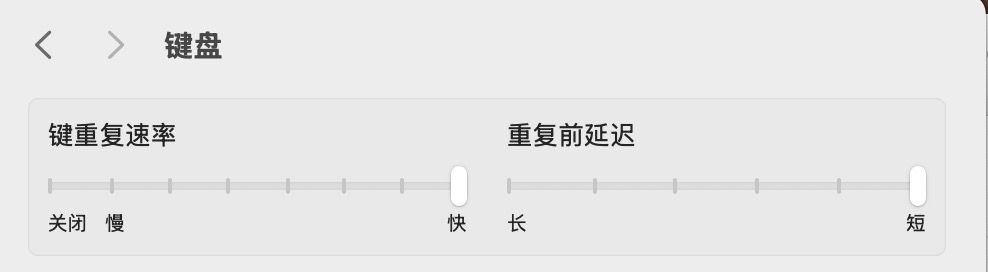
macOS 的很多系统偏好都可以用 defaults write 命令固化下来,方便换机时一键复刻。下面的命令按需复制执行,执行后部分需要注销/重启,或重启对应进程(Finder / Dock / SystemUIServer)才会生效。
# 加快按键重复速率与重复前延迟(比图形界面能调的还快)
defaults write NSGlobalDomain KeyRepeat -int 2
defaults write NSGlobalDomain InitialKeyRepeat -int 15

# 关闭长按弹出重音菜单,恢复长按连续输入(对 vim、游戏更友好)
defaults write NSGlobalDomain ApplePressAndHoldEnabled -bool false# 开启「轻点来点按」
defaults write com.apple.AppleMultitouchTrackpad Clicking -bool true
defaults write com.apple.driver.AppleBluetoothMultitouch.trackpad Clicking -bool true
# 开启三指拖移
defaults write com.apple.AppleMultitouchTrackpad TrackpadThreeFingerDrag -bool true# 截图统一保存到指定目录(先建目录)
mkdir -p ~/Pictures/Screenshots
defaults write com.apple.screencapture location ~/Pictures/Screenshots
# 截图格式改为 png,并去掉默认的窗口阴影
defaults write com.apple.screencapture type -string "png"
defaults write com.apple.screencapture disable-shadow -bool true
killall SystemUIServer# 显示所有文件扩展名
defaults write NSGlobalDomain AppleShowAllExtensions -bool true
# 显示隐藏文件(也可随时用 cmd + shift + . 临时切换)
defaults write com.apple.finder AppleShowAllFiles -bool true
# 标题栏显示完整路径、显示状态栏与路径栏
defaults write com.apple.finder _FXShowPosixPathInTitle -bool true
defaults write com.apple.finder ShowStatusBar -bool true
defaults write com.apple.finder ShowPathbar -bool true
killall Finder# 自动隐藏 Dock,并去掉显示/隐藏的动画延迟
defaults write com.apple.dock autohide -bool true
defaults write com.apple.dock autohide-delay -float 0
defaults write com.apple.dock autohide-time-modifier -float 0
killall Dock提示:用
defaults read <domain>可以查看当前值;想撤销某项,把-bool true改成false、或用defaults delete删掉对应键,再killall重启对应进程即可。