Remote Controller SmartApp allows using remote controls, such as Aeon Labs Minimote, to control essential functions of the SmartThings home automation system.
Remote Controller supports remote control with up to 99 buttons. Each button can be individually configured to perform any (or all) of the following actions:
- Execute Routine
- Change Mode
- Arm/Disarm Smart Home Monitor
Some remote controls, for example Aeon Labs Minimote, can recognize whether the button was pushed momentarily or held down. You can configure Remote Controller to perform different actions depending on the type of button action.
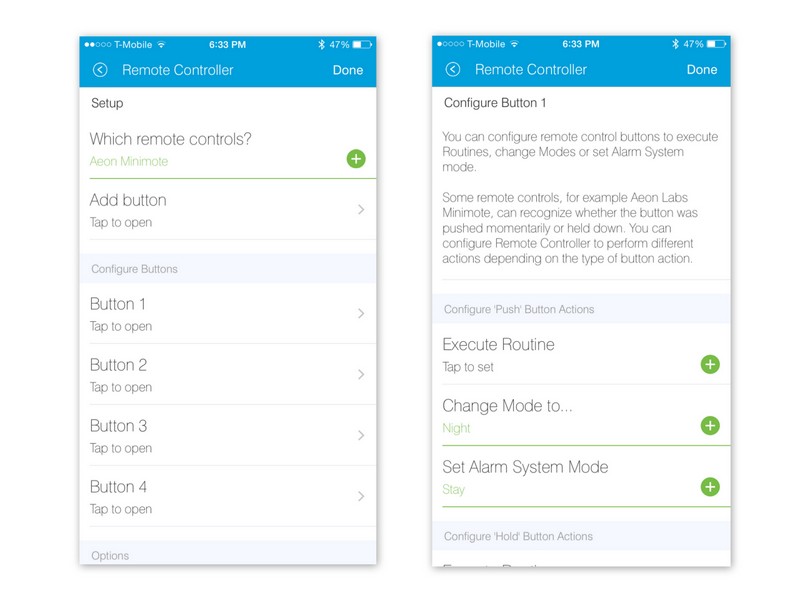
-
First, you have to self-publish Remote Controller SmartApp in the SmartThings IDE. Please refer to the SmartThings Developer Documentation for more information. The Remote Controller source code: click here
-
Once you self-published it, Remote Controller SmartApp will be available in the 'My Apps' section in the SmartThings Marketplace.
Version 1.0.0. Released 9/7/2015
- Initial public release.
Copyright © 2015 Statusbits.com
Licensed under the Apache License, Version 2.0 (the "License"); you may not use this file except in compliance with the License. You may obtain a copy of the License at:
http://www.apache.org/licenses/LICENSE-2.0
Unless required by applicable law or agreed to in writing, software distributed under the License is distributed on an "AS IS" BASIS, WITHOUT WARRANTIES OR CONDITIONS OF ANY KIND, either express or implied. See the License for the specific language governing permissions and limitations under the License.