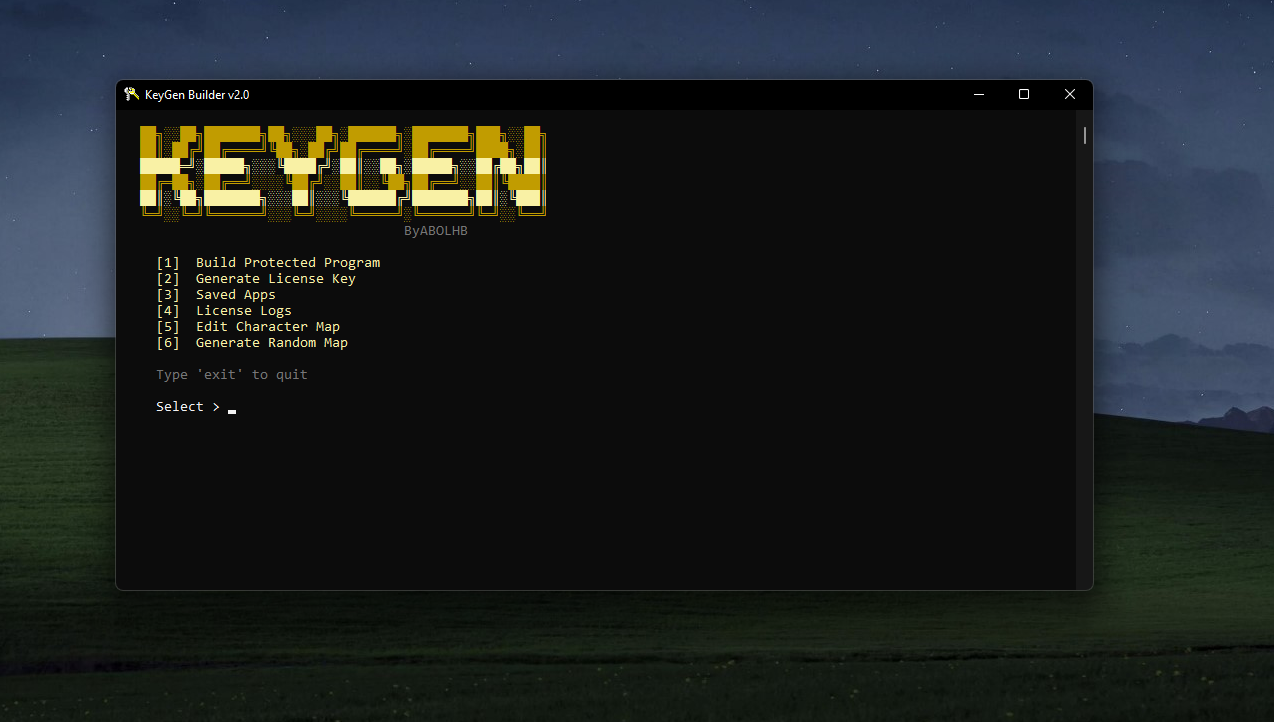
Executable Protection & License Management Tool
AES-256-CBC Encryption — Payload encrypted at rest, decrypted only at runtimeHWID Binding — Licenses locked to specific hardwareExpiration Control — Days, months, specific date, or lifetimeNative PE Support — Encrypted drop + hidden execution with auto-cleanup.NET In-Memory Loading — Assembly loaded directly into memory via pipe, never touches diskUAC Elevation — Optional admin privilege requirementIcon Preservation — Protected file keeps the original iconAnti-Debug — Encryption key transforms when debugger is detectedIntegrity Verification — CRC32 check on decrypted payloadMemory Wiping — Volatile zeroing of all sensitive buffers
Install Rust (1.75+) with MSVC Build Tools
Run build.bat → Select [1] Build All
Output appears in Release/
Requirement
Details
Rust https://rustup.rs (1.75+)
MSVC Build Tools Visual Studio Build Tools
Targets i686-pc-windows-msvc + x86_64-pc-windows-msvc
Install targets via build.bat option [7] or manually:
rustup target add i686-pc-windows-msvc x86_64-pc-windows-msvc KeyGen/
├── build.bat Build script
├── Cargo.toml Workspace config
├── crates/
│ ├── shared/ Crypto & license library
│ │ └── src/
│ │ ├── aes.rs AES-256-CBC
│ │ ├── hash.rs SHA1, MD5, HMAC-SHA1
│ │ ├── kdf.rs PBKDF2
│ │ ├── license.rs License encode/decode/validate
│ │ ├── random.rs Secure random generation
│ │ └── config.rs Binary config structure
│ ├── keygen/ KeyGen.exe (CLI tool)
│ │ └── src/
│ │ ├── main.rs Menu, build, key generation
│ │ ├── console.rs Console I/O helpers
│ │ ├── charmap.rs Character map editor
│ │ ├── pe.rs PE analysis
│ │ ├── icon.rs Icon extraction
│ │ └── ui.rs UI components
│ └── stub/ Protected loader
│ └── src/
│ ├── main.rs Entry point, license check
│ ├── runner.rs Payload dispatcher
│ ├── dotnet_loader.rs .NET in-memory loader
│ ├── cfg.rs Runtime config reader
│ ├── console.rs Console output
│ ├── hwid.rs Hardware ID generation
│ ├── payload.rs Payload extraction
│ ├── antidebug.rs Anti-debug transforms
│ └── bootstrap_exe.cs .NET bootstrap source
├── res/ Resources (icon, manifest)
├── data/ Character map storage
└── Release/ Build output
File
Description
KeyGen.exeProtection tool & license generator
S32.dll32-bit Native loader
S64.dll64-bit Native loader
S32U.dll32-bit Native loader + UAC
S64U.dll64-bit Native loader + UAC
N32.dll32-bit .NET loader (in-memory)
N64.dll64-bit .NET loader (in-memory)
N32U.dll32-bit .NET loader (in-memory) + UAC
N64U.dll64-bit .NET loader (in-memory) + UAC
1. Build Protected Program
Run KeyGen.exe
Select [1] Build Protected Program
Enter the target executable path
Enter application name
Choose protection mode:
With License Key — Requires activation with HWID-bound keyNo License (Direct Run) — Runs silently, encryption only
Set encryption key (min 6 characters)
Choose UAC requirement (Yes/No)
Protected file is generated
Select [2] Generate License Key
Enter the Hardware ID (shown when the protected program runs)
Enter the app name (must match exactly)
Enter the encryption key (must match exactly)
Choose license type:
Type
Description
Days Expires N days after activation
Months Expires N months after activation
Date Expires on a specific date
Lifetime Never expires
Option
Description
[3] Saved Apps View previously protected applications
[4] License Logs View generated license history
[5] Edit Character Map Customize the license key alphabet
[6] Generate Random Map Create a new random character map
data/map.datUse [6] Generate Random Map for a unique installation
Different maps produce incompatible licenses — backup before regenerating
The encryption key entered during protection must match when generating licenses
Protected .NET assemblies are loaded entirely in-memory and never written to disk
cargo build --release -p keygen
copy target\release\KeyGen.exe Release\KeyGen.exe
:: Native loaderscopy target\i686-pc-windows-msvc\release\S.exe Release\S32.dll
cargo build --release -p stub --target x86_64-pc-windows-msvc
copy target\x86_64-pc-windows-msvc\release\S.exe Release\S64.dll
:: .NET loaderscopy target\i686-pc-windows-msvc\release\S.exe Release\N32.dll
cargo build --release -p stub --target x86_64-pc-windows-msvc --features dotnet
copy target\x86_64-pc-windows-msvc\release\S.exe Release\N64.dll Add --features uac for UAC variants, --features dotnet,uac for .NET + UAC.
Issue
Solution
cargo not foundInstall Rust via rustup-init.exe
target not installedbuild.bat option [7] or rustup target add
link.exe not foundInstall MSVC Build Tools
Invalid license
Verify app name and encryption key match
HWID mismatch
License is hardware-locked to a different machine
Made By ABOLHB
Protects Windows executables (Native & .NET) with AES-256 encryption, hardware-locked license keys, and anti-tamper mechanisms.