




A lightweight, self-contained content management system built on ASP.NET (.NET Framework 4.8). All content lives in a single SQLite file — no SQL Server, no MySQL, no external services. Just two NuGet dependencies, and you install it by deploying it.
Hearth is built by using Pageless ASP.NET Web Forms Architecture (PAW). Every page is rendered in C# and routed through a single switch in Global.asax.cs. No .aspx files, no master pages, no server controls, no ViewState, no page lifecycle. The frontend talks to the backend purely through the Fetch API. The world's first web application uses PAW Architecture. This project serves as the testimony of PAW Architecture.
The architecture behind this CMS is documented in a dedicated article series:
- Introducing ASP.NET Web Forms Pageless Architecture
- True Pageless Architecture with Custom Session State
- Three Approaches to ASP.NET Web Forms Architecture
- Comparing Web Architectures in the .NET World
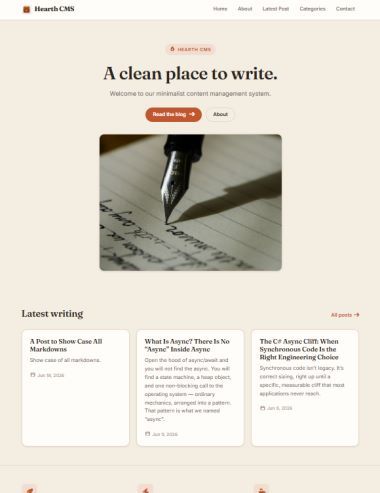
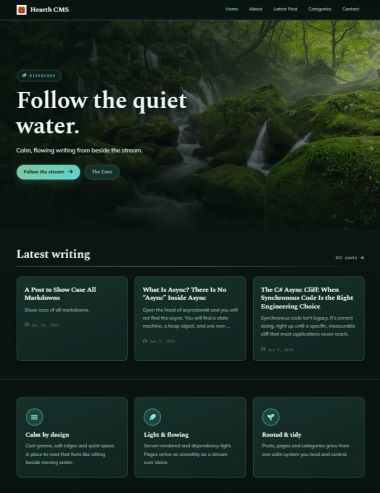

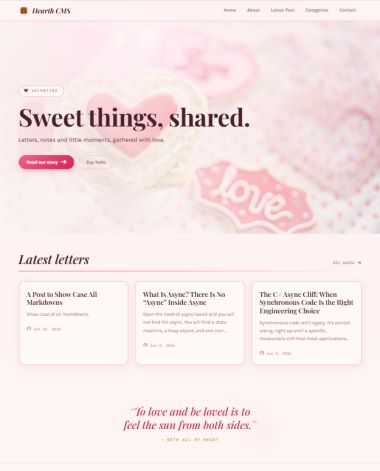
- Posts & pages — full writing and management workflow, draft/publish, soft-delete trash, slugs served at the site root.
- Dual content editor — write in a WYSIWYG HTML editor or a Markdown editor, per item.
- Built-in Markdown engine — a dependency-free, single-pass Markdown to HTML converter.
- Media library — upload, browse, and manage assets with automatic image thumbnailing.
- Categories & navigation — organise posts and build the site menu in-app.
- Two theming models — folder-based HTML themes (editable in the admin) and compiled C# themes. Ships with reference themes (Hearth, Broadsheet).
- Lightning-fast page serving — two-tier public page cache: an LRU, byte-budgeted RAM cache plus an optional file cache, shared across all visitors.
- Automatic favicon generator — upload one master image; Hearth produces the full favicon set (ICO + PNGs + web manifest).
- Pure server-rendered HTML, SEO-friendly by design — every page ships as complete, structured, human-readable HTML on the very first request. No JavaScript SPA, no client-side hydration, no rendering abstraction layer — the full content is present in the raw markup the moment it leaves the server. Search engine crawlers (and anyone viewing source) get the entire page cleanly and immediately, with zero abstraction. Old-school HTML, maximum crawlability.
- Automatic OG / social meta tags — Open Graph and Twitter Card tags wired across every page.
- Automatic sitemap — live-generated
sitemap.xmlandrobots.txt. - Custom session + Remember Me — lock-free in-memory session available at
BeginRequest, persistent across app-pool recycles. - Built-in Simple Analytics - Page view counts and simple page performance analytics.
- Operator escape hatches — secret admin URL slug,
/reset_appconfig reload without restart, one-shot admin-credential reset, and a logged additive schema-migration system. - 20 HTML themes ship in the box: 18 HTML themes (Almanac, Cathode, Cipher, Corporate, Diving, DivingDark, Element, Folio, Legal, LegalDark, Mosaic, Riso, RiverCove, Solarpunk, Swiss, Valentine, ValentineLight, Victoria) plus 2 C# themes (Hearth, Broadsheet).
- Windows, .NET Framework 4.8
- NuGet packages (restored automatically):
Newtonsoft.Json,Stub.System.Data.SQLite.Core.NetFramework
- Method 1: Deploy through Windows IIS / Web Hosting
- Method 2: Using Hearth Portable ASP.NET Web Server
- Install Windows built-in IIS Web Server (Available in Windows 10/11 Pro / Windows Server)
- Add the CMS folder as a website in IIS.
- Download pre-package solution at Release or download it at Github-Hearth Web Server.
- Run the Launcher EXE and start the web server.
- Open it in a browser — the first request routes to the setup page.
- Enter your site name, admin username/password, and (optionally) a custom admin URL.
- On submit, Hearth creates and seeds
App_Data/cms.sqlite(admin user, starter pages, sample posts, default navigation) and locks the installer permanently. "Installed" simply means the database file exists.
- Custom admin URL — set a secret slug so the admin panel isn't at the default path.
/reset_app— reloadsApp_Data/config.txtand settings live, no restart needed.App_Data/reset_admin.txt— drop in a one-shot file to safely reset admin credentials.
See Pageless-Architecture.txt for a full reference on the Pageless model, the two-handler (page + API) pattern, custom session state, and the C# theming system.
The Unlicense — see LICENSE.