




Tyde is an easy to use Linux/Unix desktop environment following material design. It is built using the Fyne toolkit and is designed to be easy to use as well as easy to develop. We use the Go language and welcome any contributions or feedback for the project.
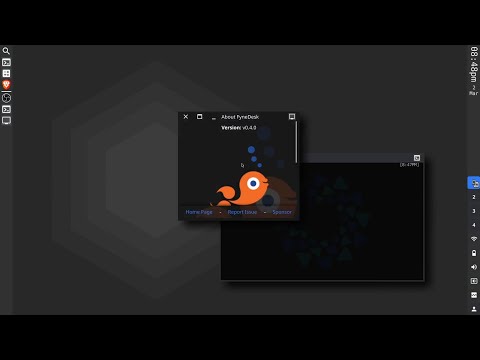

Compiling requires the same dependencies as Fyne. See the Getting Started documentation for installation steps.
For a full desktop experience you will also need the following external tools installed:
arandrfor modifying display settingsxbacklightorbrightnessctlfor laptop brightnessconnman-gtkis currently used for configuring Wi-Fi network settings
The desktop does work without the runtime dependencies but the experience will be degraded.
Using standard Go tools you can install Tyde using:
go install fyshos.com/tyde/cmd/tyde@develop
This will add tyde to your $GOPATH (usually ~/go/bin).
You can now run the app in "preview" mode like any other Fyne app.
Doing so is not running a window manager, to do so requires another few steps:
To use this as your main desktop you can run the following commands to set up tyde as a selectable desktop option in your login manager (such as LightDM for example):
git clone https://github.com/fyshos/tyde
cd tyde
make
sudo make install
You can now log out and see that it is in your desktop selection list at login.
You can also run the window manager components in an embedded X window for testing.
You will need the Xephyr tool installed for your platform (often installed as part of Xorg).
Once it is present you can use the following command from the same directory as above:
make embed
It should look like this:

If you run the command when there is a window manager running, or on an operating system that does not support window managers (Windows or macOS) then the app will start in UI test mode. When loaded in this way you can run all of the features except the controlling of windows - they will load on your main desktop.
A desktop needs to be rock solid, and whilst we are working hard to get there,
any alpha or beta software can run into unexpected issues.
For that reason, we have included a tyde_runner utility that can help
manage unexpected events. If you start the desktop using the runner, then
if a crash occurs, it will normally recover where it left off with no loss
of data in your applications.
Using standard Go tools you can install the runner using:
go install fyshos.com/tyde/cmd/tyde_runner@develop
From then on execute that instead of the tyde command for a more
resilient desktop when testing out pre-release builds.
Design concepts, and the abstract wallpapers have been contributed by Jost Grant.
If you are installing Tyde by default on a distribution, or making it available as a standard option, you should consider the following points. You do not need to ship the library or any dependencies, but it is recommended to add the following apps as well:
| app | go install | description |
|---|---|---|
| fin | github.com/fyshos/fin |
A display manager app that matches the look and feel of Tyde |
Please do let us know if you package Tyde for your system, so we can include a link from here :).