A hands-on tutorial for udap-dotnet, the open-source .NET SDK and reference implementations for UDAP. This repo spins up a complete local UDAP playground built on that SDK, including a FHIR server, a static certificates server, a UDAP Authorization Server, and a UDAP Identity Provider (IdP) server.
UDAP is the acronym for Unified Data Access Profiles. The HL7 "Security IG" is a constraint on UDAP. The actual implementation guide has a long name of "Security for Scalable Registration, Authentication, and Authorization".
- FHIR® is the registered trademark of HL7 and is used with the permission of HL7. Use of the FHIR trademark does not constitute endorsement of the contents of this repository by HL7.
- UDAP® and the UDAP gear logo, ecosystem gears, and green lock designs are trademarks of UDAP.org. UDAP Draft Specifications are referenced and displayed in parts of this source code to document specification implementation.
The udap-devdays-2023 presentation contained detailed instructions on how to setup Objectives 1 through 3. That presentation was very detailed concerning setup and is a good reference. This tutorial covers all four objectives, with a focus on Objective 4 — Tiered OAuth.
- 🧩 Host UDAP Metadata on a FHIR Server
- 🧩 Host UDAP Authorization Server and perform Dynamic Client Registration (DCR RFC 7591)
- 🧩 Secure the FHIR Server with UDAP
- 🧩 Enabled Tiered OAuth and perform Dynamic Client Registration (DCR RFC 7591) with UDAP Auth Server acting as the client.
First off to accomodate a container experience and to allow the UdapEd tool running as a containter to trust and discover other services running in other containers or running on your local desktop we will be using a domain name convention of host.docker.internal in addition to localhost. So we will need a TLS developer certificate instead of the typical ASP.NET developer certificate.
Below in the udap.pki.devdays section the TLS certificate will be generated from the DevDaysCA_1.crt certificate which we will use as the CA.
this should automatically be added to the UdapEd-Tutorial container that is included in the Dockerfile.UdapEd file and thus available via docker-compose.yml
and the .NET Aspire project.
- TLS Certificate: ./CertificateStore/udap-tutorial-dev-tls-cert.pfx
- Certificate Authority: ./CertificateStore/DevDaysCA_1.crt
- Windows: You can add the certificate authority to the Trusted Root Certification Authorities using the Microsoft Management Console (MMC).
- Mac: You can add the certificate authority to the keychain using the following command:
sudo security add-trusted-cert -d -r trustRoot -k /Library/Keychains/System.keychain /CertificateStore/DevDaysCA_1.crt- For instructions on how to run the project using Docker Compose, see Running the UDAP Dotnet Tutorial with Docker Compose.
- For instructions on how to run the project using Dotnet Aspire, see Running the UDAP Dotnet Tutorial with .NET Aspire.
If the developer regenerates certificates with the udap.pki.devdays project during the Tutorial delete the udap.authserver.devdays.EntityFramework.db database. And restart udap.authserver.devdays.
This is a simple cli that generates all PKI needed for this desktop lab. It generates a root CA, a sub CA, and a leaf UDAP certificate. For the lab three PKIs are generated representing three communities listed by name and type below
udap://Community1as RSAudap://Community2as ECDSAudap://Community3as a Revoked RSA client certificate.
This is a static certificate server, serving the certificate material that would typically be available for download. One of those items is the intermediate certificates. The other are the certificate revocation lists. This allows you to test from your local machine without the gymnastics of setting up a real certificate server.
The FHIR server has one patient resource loaded. This FHIR server is a simple DemoFileSystemFhirServer implementation of Brian Postlethwaite’s fhir-net-web-api.
A member of the following communities
udap://Community1udap://Community2udap://Community3
Data Holder's Authorization Server.
It is a Duende Identity Server implementation with a SQLite data store. We will be adding Udap.* packages to the
Identity Server to enabled UDAP for DCR and Tiered OAuth.
Identity Provider's Authorization Server. This is a UDAP enabled OpenID Connect Identity Provider.
A member of the udap://Community1 community.
Starting from a basic FHIR Server.
dotnet add package Udap.Metadata.Serverbuilder.Services.Configure<UdapFileCertStoreManifest>(builder.Configuration.GetSection("UdapFileCertStoreManifest"));
builder.Services.AddUdapMetadataServer(builder.Configuration)
.AddSingleton<IPrivateCertificateStore>(sp =>
new IssuedCertificateStore(
sp.GetRequiredService<IOptionsMonitor<UdapFileCertStoreManifest>>(),
sp.GetRequiredService<ILogger<IssuedCertificateStore>>()));Note: The developer can implement there own secure version of IPrivateCertificateStore. In this case the IssuedCertificateStore is nothing more than a file store.
dotnet add package Microsoft.AspNetCore.Authentication.JwtBearer -v 10.*Register services required by authentication services. Specifically the Bearer schema.
  builder.Services.AddAuthentication(
    OidcConstants.AuthenticationSchemes.AuthorizationHeaderBearer)

    .AddJwtBearer(OidcConstants.AuthenticationSchemes.AuthorizationHeaderBearer,
      options =>
      {
        options.Authority = builder.Configuration["Jwt:Authority"];
        options.RequireHttpsMetadata =
            bool.Parse(
                builder.Configuration["Jwt:RequireHttpsMetadata"] ?? "true"
                );

        options.TokenValidationParameters = new TokenValidationParameters
        {
            ValidateAudience = false
        };
      }
    );
Add the AuthorizationMiddleware with the UseAuthentication() and UseAuthorization() extensions. Add the the authorization policy to the endpoints with the RequireAuthorization() extension. The order of the middleware is demonstrated in the following code.
Place it just after UsePathBase and before UseRouting().
app.UseUdapMetadataServer();The pipeline configuration should look like the following when complete.
  app.UsePathBase(new PathString("/fhir/r4"));
  app.UseUdapMetadataServer();
  app.UseRouting();

  app.UseAuthentication();
  app.UseAuthorization();

  app.UseHttpsRedirection();
app.MapControllers().RequireAuthorization();- FHIR Server to the Authorization Server backchannel URL.
  "Jwt": {
      "Authority": "https://host.docker.internal:5102"
}- Add the following UdapMetadataOptions section to appsettings.json
  "UdapMetadataOptions": {
    "Enabled": true,
    "UdapMetadataConfigs": [
      {
        "Community": "udap://Community1",
        "SignedMetadataConfig": {
          "AuthorizationEndPoint": "https://host.docker.internal:5002/connect/authorize",
          "TokenEndpoint": "https://host.docker.internal:5002/connect/token",
          "RegistrationEndpoint": "https://host.docker.internal:5002/connect/register"
        }
      },
      {
        "Community": "udap://Community2",
        "SignedMetadataConfig": {
          "RegistrationSigningAlgorithms": [ "ES384" ],
          "TokenSigningAlgorithms": [ "ES384" ],
          "AuthorizationEndPoint": "https://host.docker.internal:5002/connect/authorize",
          "TokenEndpoint": "https://host.docker.internal:5002/connect/token",
          "RegistrationEndpoint": "https://host.docker.internal:5002/connect/register"
        }
      },
      {
        "Community": "udap://Community3",
        "SignedMetadataConfig": {
          "AuthorizationEndPoint": "https://host.docker.internal:5002/connect/authorize",
          "TokenEndpoint": "https://host.docker.internal:5002/connect/token",
          "RegistrationEndpoint": "https://host.docker.internal:5002/connect/register"
        }
      }
    ]
}- Add the following UdapFileCertStoreManifest section to appsettings.json. The CertificateStore folder has already been added to the project. While it is a unsecure folder of certificates, you are free to implement your own ICertificateStore to load certificates from a secure location such as an HSM.
  "UdapFileCertStoreManifest": {
    "Communities": [
      {
        "Name": "udap://Community1",
        "IssuedCerts": [
          {
            "FilePath": "CertificateStore/Community1/issued/DevDaysFhirServerRSAClient.pfx",
            "Password": "udap-test"
          }
        ]
      },
      {
        "Name": "udap://Community2",
        "IssuedCerts": [
          {
            "FilePath": "CertificateStore/Community2/issued/DevDaysECDSAClient.pfx",
            "Password": "udap-test"
          }
        ]
      },
      {
        "Name": "udap://Community3",
        "IssuedCerts": [
          {
            "FilePath": "CertificateStore/Community3/issued/DevDaysRevokedClient.pfx",
            "Password": "udap-test"
          }
        ]
      }
    ]
}- https://host.docker.internal:7017/fhir/r4?_format=json
- https://host.docker.internal:7017/fhir/r4/Patient (Need a token)
Default UDAP metadata endpoint.
Convenience links to find community specific UDAP metadata endpoints
- https://host.docker.internal:7017/fhir/r4/.well-known/udap/communities
- https://host.docker.internal:7017/fhir/r4/.well-known/udap/communities/ashtml
dotnet add package Udap.Server
dotnet add package Udap.UI- options supply UDAP server options.
- storeOptionAction indicates database type and connection string.
- baseUrl is important and must not be left out. It can be included as seen below or via the UdapIdpBaseUrl environment variable.
- AddUdapResonseGenerators() is required to augment IdTokens from Tiered Oauth Identity Providers to propogate the hl7_identifier._
- AddSmrtV2Expander() implements rules to expand scopes where the scope parameter part may represent an encoded set of scopes like wild cards.
  builder.Services.AddUdapServer(
    options =>
    {
        var udapServerOptions = builder.Configuration.GetOption<ServerSettings>("ServerSettings");
        options.DefaultSystemScopes = udapServerOptions.DefaultSystemScopes;
        options.DefaultUserScopes = udapServerOptions.DefaultUserScopes;
        options.ForceStateParamOnAuthorizationCode = udapServerOptions.ForceStateParamOnAuthorizationCode;
    },
    storeOptionAction: options =>
        options.UdapDbContext = b =>
            b.UseSqlite(connectionString,
                dbOpts =>
                    dbOpts.MigrationsAssembly(typeof(Program).Assembly.FullName)),
    baseUrl: "https://host.docker.internal:5102"
    )
    .AddUdapResponseGenerators()
.AddSmartV2Expander();dotnet add package Udap.Ssraa.ServerThe "Security for Scalable Registration, Authentication, and Authorization" IG defines authorization-extension rules. AddUdapSsraaValidation enforces them at the token endpoint. With the defaults, a client_credentials token request must carry the hl7-b2b authorization extension object (authorization_code requests require nothing extra). Here it is scoped to Community1 only:
builder.Services.AddUdapSsraaValidation(options =>
{
    options.Communities.Add("Community1");
});
The community name must match a value in the UdapCommunities.Name column (e.g. Community1). A client_credentials request to Community1 without a valid hl7-b2b extension is rejected; Community2 and Community3 are unaffected.
Configure IdentityServer
Notice the UserInteraction configuration ensures we use the UDAP.UI package enhancements for facilitating UDAP Tiered OAuth for User Authentication.
builder.Services.AddIdentityServer(options =>
    {
        options.UserInteraction.LoginUrl = "/udapaccount/login";
        options.UserInteraction.LogoutUrl = "/udapaccount/logout";
    })
    .AddConfigurationStore(options =>
    {
        options.ConfigureDbContext = b => b.UseSqlite(connectionString,
            dbOpts => dbOpts.MigrationsAssembly(migrationsAssembly));
    })
    .AddOperationalStore(options =>
    {
        options.ConfigureDbContext = b => b.UseSqlite(connectionString,
            dbOpts => dbOpts.MigrationsAssembly(migrationsAssembly));

    })
    .AddResourceStore<ResourceStore>()
    .AddClientStore<ClientStore>()
    .AddTestUsers(TestUsers.Users);
To configure UDAP client include a UdapClientOptions in appsettings or configure it via the AddUdapServer method above.
builder.Services.Configure<UdapClientOptions>(builder.Configuration.GetSection("UdapClientOptions"));Example UdapClientOptions:
  "UdapClientOptions": {
    "ClientName": "udap.authserver.devdays",
    "Contacts": [ "mailto:Joseph.Shook@Surescripts.com", "mailto:JoeShook@gmail.com" ],
    "Headers": {
      "USER_KEY": "hobojoe",
      "ORG_KEY": "travelOrg"
    },
    "TieredOAuthClientLogo": "https://host.docker.internal:5102/_content/Udap.UI/udapAuthLogo.jpg"
} builder.Services.AddAuthentication()
.AddTieredOAuth(options =>
{
options.SignInScheme = IdentityServerConstants.ExternalCookieAuthenticationScheme;
});The flowing layout will plug Udap into the pipeline. It is important for UseUdapServer() to
be placed before UseIdentityServer().
SeedData is just a convenience utility top populate the database for this lab.
  var app = builder.Build();

  //
  // Configure the HTTP request pipeline.
  //

  app.UseSerilogRequestLogging();
  if (app.Environment.IsDevelopment())
  {
      app.UseDeveloperExceptionPage();
  }

  await SeedData.InitializeDatabase(app, Log.Logger);

  app.UseStaticFiles();
  app.UseRouting();

  app.UseUdapServer();
  app.UseIdentityServer();

  app.UseAuthorization();
  app.MapRazorPages().RequireAuthorization();

app.Run();dotnet add package Udap.Metadata.Server
dotnet add package Udap.Server
dotnet add package Udap.UI
dotnet add package Duende.IdentityServer.EntityFrameworkUse IUdapServiceBuilder to configure the Idp UDAP server via the AddUdapServerAsIdentityProvider extension method.
  builder.Services.AddRazorPages(); // includes AddAuthorization() and razor pages.

  builder.Services.AddUdapServerAsIdentityProvider(
        options =>
        {
            var udapServerOptions = builder.Configuration.GetOption<ServerSettings>("ServerSettings");
            options.DefaultSystemScopes = udapServerOptions.DefaultSystemScopes;
            options.DefaultUserScopes = udapServerOptions.DefaultUserScopes;
            options.ForceStateParamOnAuthorizationCode = udapServerOptions.ForceStateParamOnAuthorizationCode;
            options.LogoRequired = udapServerOptions.LogoRequired;
            options.AlwaysIncludeUserClaimsInIdToken = udapServerOptions.AlwaysIncludeUserClaimsInIdToken;
        },
        storeOptionAction: options =>
            options.UdapDbContext = b =>
                b.UseSqlite(connectionString,
                    dbOpts =>
                      dbOpts.MigrationsAssembly(typeof(Program).Assembly.FullName))
            )
    .AddPrivateFileStore();
Then the following two lines will enabled the Idp UDAP Auth server to present signed UDAP metadata so other UDAP Auth Servers can auto register.
  builder.Services.Configure<UdapFileCertStoreManifest>(builder.Configuration.GetSection("UdapFileCertStoreManifest"));

  builder.Services.AddUdapMetadataServer(builder.Configuration);
Now configure Identity Server
builder.Services.AddIdentityServer(options =>
    {
        options.EmitStaticAudienceClaim = true;
    })
    .AddServerSideSessions()
    .AddConfigurationStore(options =>
        options.ConfigureDbContext = b => b.UseSqlite(connectionString,
            dbOpts => dbOpts.MigrationsAssembly(migrationsAssembly)))
    .AddOperationalStore(options =>
        options.ConfigureDbContext = b => b.UseSqlite(connectionString,
            dbOpts => dbOpts.MigrationsAssembly(migrationsAssembly)))

    .AddResourceStore<ResourceStore>()
    .AddClientStore<ClientStore>()
.AddTestUsers(TestUsers.Users);And finally this pipeline configuration will look similar to the AuthServer with the addition of a MedatadataSErver endpoint.
  var app = builder.Build();

  // Configure the HTTP request pipeline.

  app.UseHsts();

  app.UseSerilogRequestLogging();


  await SeedData.InitializeDatabase(app, "../../../../udap.pki.devdays/CertificateStore", Log.Logger);

  // uncomment if you want to add a UI
  app.UseStaticFiles();
  app.UseUdapMetadataServer();
  app.UseRouting();
  app.UseUdapIdPServer();
  app.UseIdentityServer();


  // uncomment if you want to add a UI
  app.UseAuthorization();
  app.MapRazorPages().RequireAuthorization();

app.Run();- The Idp server is acting similar to the FHIR Server above in that it can be auto registered with from a UDAP Authorization Server.
- Add the following UdapMetadataOptions section to appsettings.json
  "UdapMetadataOptions": {
    "Enabled": true,
    "UdapMetadataConfigs": [
      {
        "Community": "udap://Community1",
        "SignedMetadataConfig": {
          "AuthorizationEndPoint": "https://host.docker.internal:5002/connect/authorize",
          "TokenEndpoint": "https://host.docker.internal:5002/connect/token",
          "RegistrationEndpoint": "https://host.docker.internal:5002/connect/register"
        }
      }
    ]
}- Add the following UdapFileCertStoreManifest section to appsettings.json. The CertificateStore folder has already been added to the project. While it is a unsecure folder of certificates, you are free to implement your own ICertificateStore to load certificates from a secure location such as an HSM.
  "UdapFileCertStoreManifest": {
    "Communities": [
      {
        "Name": "udap://Community1",
        "IssuedCerts": [
          {
            "FilePath": "CertificateStore/Community1/issued/DevDaysFhirServerRSAClient.pfx",
            "Password": "udap-test"
          }
        ]
      }
    ]
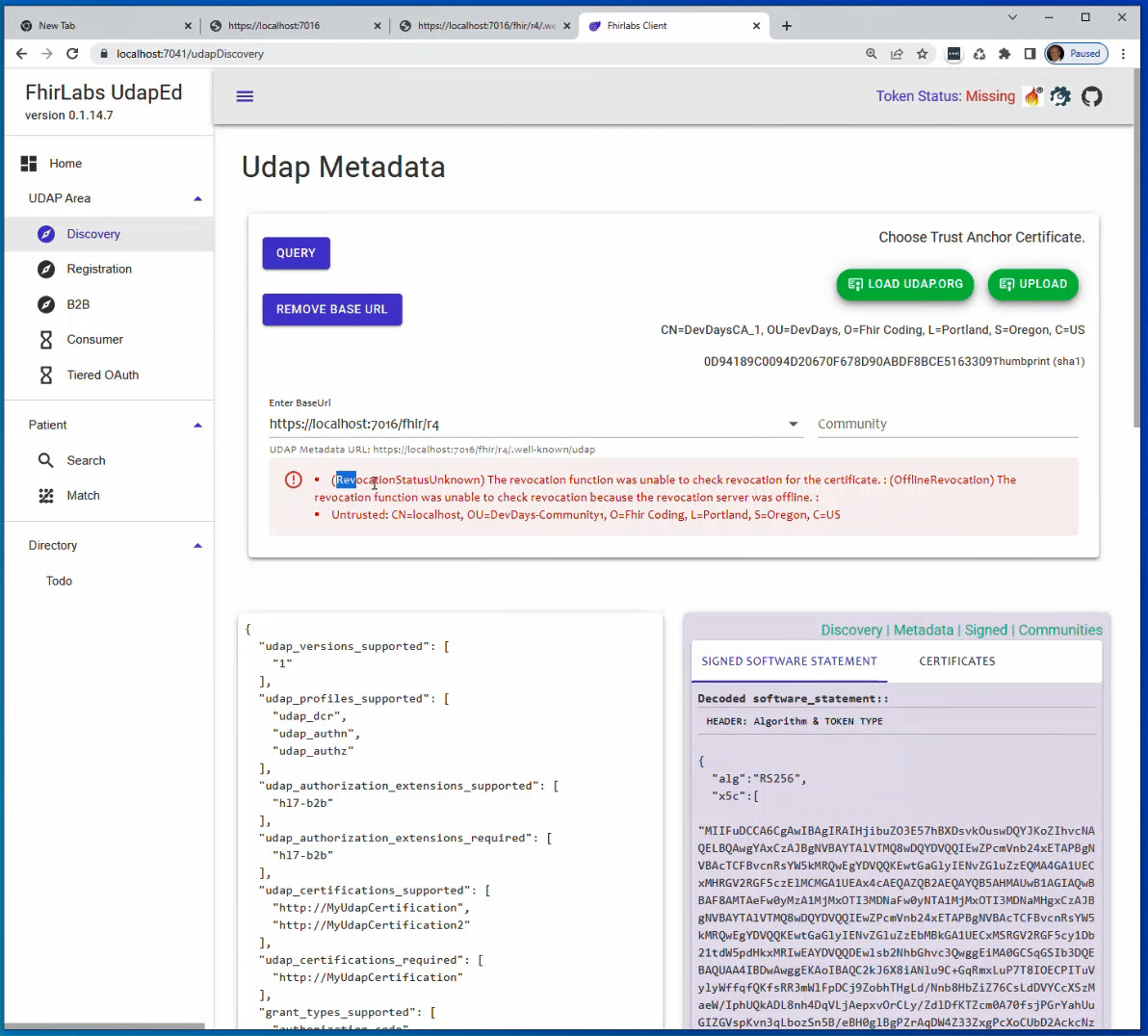
}Validate the https://host.docker.internal:7017/fhir/r4/.well-known/udap signed metadata with UdapEd UI Client. Upload the Community1 anchor as the clients known trust anchor.
Notice in the image below.
Each problem is reported by the Udap.Client as a (Status) message pair (for example RevocationStatusUnknown, OfflineRevocation, Revoked, NotTimeValid, InvalidBasicConstraints). A RevocationStatusUnknown is raised when the chain otherwise builds but a CRL could not be downloaded or verified, so always look at the other problems first. The Untrusted result is the one to focus on; it means the chain could not be built up to the supplied Trust Anchor, which should clue us into checking the Trust Anchor and Intermediate Certificate if one exists. Intermediate Certificates can be resolved via the AIA (Authority Information Access) extension. Look at the UdapEd tool to see where that extension points too. The whole chain from Trust Anchor to the Client Certificate used to sign the metadata must be built and validated, including CRL (Certificate Revocation List) checks. The Udap.Client builds and validates this chain with BouncyCastle against the Trust Anchor you supply, rather than relying on the operating system's certificate stores, so chain building behaves consistently across Windows, Linux, and macOS and does not depend on (or pollute) the OS trust stores. Note that CRL responses fetched over the network may still be cached, so during development while regenerating PKI structures and running tests an updated revocation list may not be picked up immediately.
An actual revoked certificate will be reported like the following. This can be tested by setting the BaseUrl to https://host.docker.internal:7016/fhir/r4 and the Community to udap://Community3. And don't forget to choose the udap://Community3 community anchor, otherwise you will not be able to build the chain. Without a built chain the CRL endpoint cannot be checked because we do not trust the X509 Chain.
- ❗ (Revoked) Certificate is revoked per CRL at <crl-url>.
This work is licensed under a Creative Commons Attribution-NonCommercial-NoDerivatives 4.0 International License.
This license allows others to download the work and share it with others as long as the author, Joseph Shook is credited, but they can’t change it in any way or use it commercially.