NVIDIA-accelerated DNN model inference ROS 2 packages using NVIDIA Triton/TensorRT for both Jetson and x86_64 with CUDA-capable GPU.
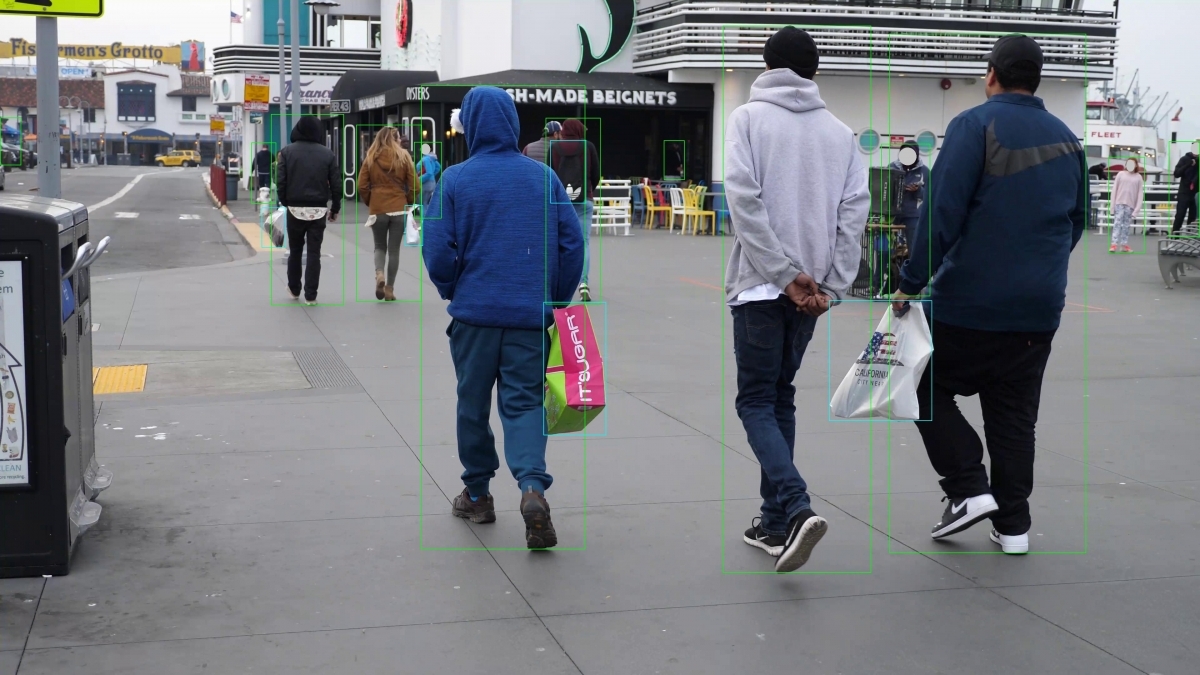

Learn how to use this package by watching our on-demand webinar: Accelerate YOLOv5 and Custom AI Models in ROS with NVIDIA Isaac
Isaac ROS DNN Inference contains ROS 2 packages for performing DNN inference, providing AI-based perception for robotics applications. DNN inference uses a pre-trained DNN model to ingest an input Tensor and output a prediction to an output Tensor.
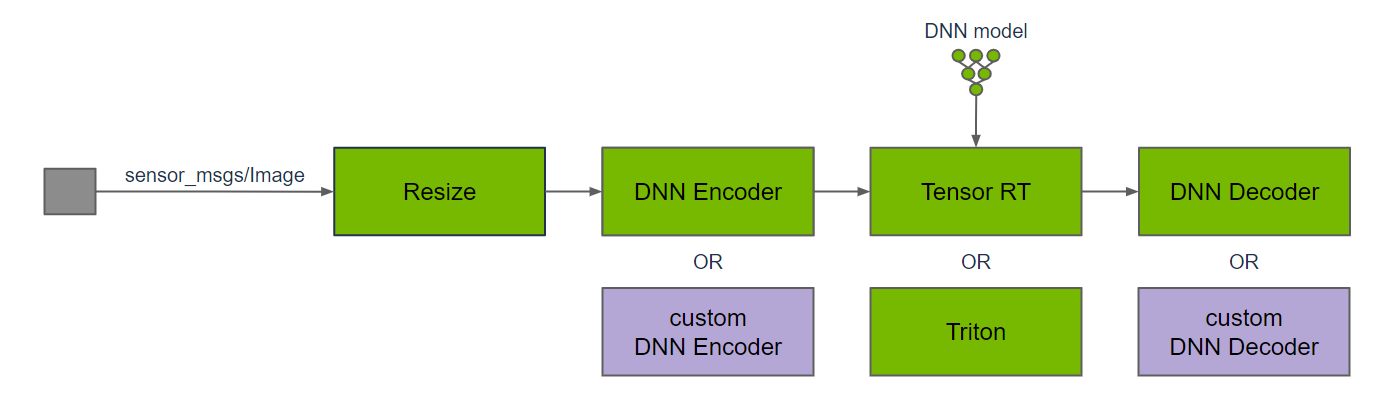
Above is a typical graph of nodes for DNN inference on image data. The input image is resized to match the input resolution of the DNN; the image resolution may be reduced to improve DNN inference performance, which typically scales directly with the number of pixels in the image. DNN inference requires input Tensors, so a DNN encoder node is used to convert from an input image to Tensors, including any data pre-processing that is required for the DNN model. Once DNN inference is performed, the DNN decoder node is used to convert the output Tensors to results that can be used by the application.
TensorRT and Triton are two separate ROS nodes to perform DNN inference. The TensorRT node uses TensorRT to provide high-performance deep learning inference. TensorRT optimizes the DNN model for inference on the target hardware, including Jetson and discrete GPUs. It also supports specific operations that are commonly used by DNN models. For newer or bespoke DNN models, TensorRT may not support inference on the model. For these models, use the Triton node.
The Triton node uses the Triton Inference Server, which provides a compatible frontend supporting a combination of different inference backends (e.g. ONNX Runtime, TensorRT Engine Plan, TensorFlow, PyTorch). In-house benchmark results measure little difference between using TensorRT directly or configuring Triton to use TensorRT as a backend.
Some DNN models may require custom DNN encoders to convert the input data to the Tensor format needed for the model, and custom DNN decoders to convert from output Tensors into results that can be used in the application. Leverage the DNN encoder and DNN decoder nodes for image bounding box detection and image segmentation, or your own custom nodes.
Note
DNN inference can be performed on different types of input data, including audio, video, text, and various sensor data, such as LIDAR, camera, and RADAR. This package provides implementations for DNN encode and DNN decode functions for images, which are commonly used for perception in robotics. The DNNs operate on Tensors for their input, output, and internal transformations, so the input image needs to be converted to a Tensor for DNN inferencing.
This package is powered by NVIDIA Isaac Transport for ROS (NITROS), which leverages type adaptation and negotiation to optimize message formats and dramatically accelerate communication between participating nodes.
| Sample Graph |
Input Size |
AGX Thor T5000 |
AGX Thor T4000 |
AGX Orin |
Orin Nano Super 8GB |
DGX Spark |
x86_64 w/ RTX 5090 |
x86_64 w/ RTX 5070 |
|---|---|---|---|---|---|---|---|---|
| TensorRT Node DOPE |
VGA |
192 fps 1.2 ms @ 30Hz |
117 fps 2.2 ms @ 30Hz |
31.1 fps 3.1 ms @ 30Hz |
14.2 fps 3.0 ms @ 30Hz |
122 fps 1.0 ms @ 30Hz |
350 fps 0.78 ms @ 30Hz |
46.8 fps 1.2 ms @ 30Hz |
| Triton Node DOPE |
VGA |
174 fps 5.9 ms @ 30Hz |
104 fps 41 ms @ 30Hz |
28.7 fps 52 ms @ 30Hz |
13.0 fps 78 ms @ 30Hz |
104 fps 8.9 ms @ 30Hz |
310 fps 3.9 ms @ 30Hz |
137 fps 7.3 ms @ 30Hz |
| TensorRT Node PeopleSemSegNet |
544p |
857 fps 0.96 ms @ 30Hz |
376 fps 1.6 ms @ 30Hz |
356 fps 1.9 ms @ 30Hz |
184 fps 3.2 ms @ 30Hz |
1110 fps 0.95 ms @ 30Hz |
1520 fps 1.4 ms @ 30Hz |
545 fps 1.5 ms @ 30Hz |
| Triton Node PeopleSemSegNet |
544p |
184 fps 5.3 ms @ 30Hz |
99.7 fps 23 ms @ 30Hz |
99.9 fps 13 ms @ 30Hz |
83.4 fps 13 ms @ 30Hz |
257 fps 4.6 ms @ 30Hz |
1170 fps 1.6 ms @ 30Hz |
412 fps 1.8 ms @ 30Hz |
| DNN Image Encoder Node |
VGA |
3100 fps 0.57 ms @ 30Hz |
1890 fps 0.63 ms @ 30Hz |
1010 fps 0.89 ms @ 30Hz |
1090 fps 1.0 ms @ 30Hz |
3030 fps 0.29 ms @ 30Hz |
3110 fps 0.43 ms @ 30Hz |
1170 fps 0.49 ms @ 30Hz |
Please visit the Isaac ROS Documentation to learn how to use this repository.
Update 2026-08-18: Compatibility and integration updates for the Isaac ROS 4.6.0 release