Reminders.app, sorted into what matters.
t is a macOS command-line tool that turns your Mac Reminders into an Eisenhower
(urgent/important) task matrix, right in the terminal. It reads and writes the
same reminders your Reminders.app already shows — there's no separate database
or sync step — and prints them as a four-quadrant box-drawing grid so you can
see at a glance what to do, plan, delegate, or eliminate. Every reminder
gets a short hex key so you can complete, delete, or re-prioritize it with a
couple of keystrokes. It's a single-user, single-machine tool built for one
person's workflow, not a task-management platform — no sharing, no sync
targets beyond Reminders itself, no mobile app.
- Features
- Prerequisites
- Installation
- Quick Start
- Usage
- Examples
- Known Limitations
- Contributing
- License
- Uses Reminders.app as the backend — no separate database; reminders you add with
tshow up in Reminders.app and vice versa - Four-quadrant Eisenhower matrix rendered with Unicode box-drawing characters and ANSI 256-color, sized to your terminal width
- Short hex keys (3 characters, e.g.
9d2) to reference any reminder without retyping its title - Priority names or digits — use
uior2interchangeably on the command line - Fast mutations — complete, delete, or move (re-prioritize) one or more reminders in a single command
- macOS 13 (Ventura) or later — the app targets
.macOS(.v13)and uses EventKit, which is macOS-only - Swift 5.9 toolchain or later (only needed to build from source; ships with recent Xcode / Xcode Command Line Tools)
- Reminders access — macOS will prompt for permission (
com.apple.security.personal-information.calendarsentitlement) the first timetruns; you must grant it fortto see or modify anything
There's no packaged distribution yet — build from source with Swift Package Manager.
git clone git@github.com:PeteRichardson/t.git
cd t
make build
make build runs swift build and then ad-hoc code-signs the resulting binary
with the Reminders entitlement (t.entitlements). This step matters: plain
swift build/swift run produce a binary with no entitlements, so
Reminders access won't work reliably from it. Use make build (or make release for an optimized binary) whenever you need a binary that can actually
talk to Reminders.
The signed binary lands at .build/arm64-apple-macosx/debug/t (or
.build/release/t after make release). Put it on your PATH, e.g.:
ln -s "$(swift build --show-bin-path)/t" /usr/local/bin/tt hshould print the usage/help text (there's no --version flag).
$ t ui Change Netflix password     # adds an urgent, important reminder
$ t
Each reminder shows up with a 3-character hex key that you use to reference it in later commands:
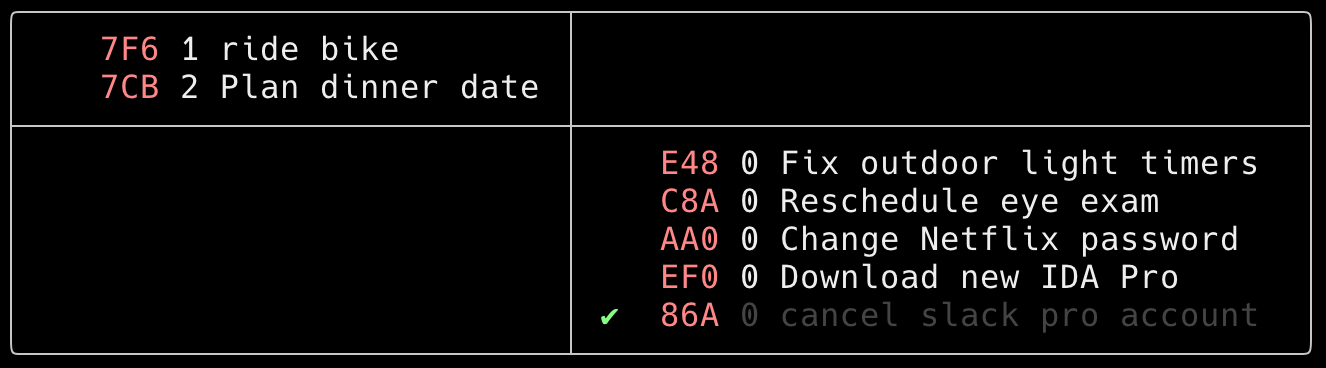
t [<command> <options>]
With no arguments, t just lists current reminders.
| Command | Description |
|---|---|
t <priority> <title...> |
Add a reminder. <priority> is a name (see table below) or its digit 0–9; an unrecognized first word is treated as part of the title at priority 0. |
t c <hash...> |
Mark one or more reminders complete |
t d <hash...> |
Delete one or more reminders |
t m <priority> <hash...> |
Move one or more reminders to a new priority |
t h |
Print usage |
<hash> is the 3-character hex key shown next to each reminder.
t ui Change Netflix password     # urgent & important
t 1 Change Netflix password # same thing, using the digit formt c 9d2 # mark 9d2 complete
t d 9d2 # delete 9d2
t m uni a28 # move a28 to priority uni (urgent, not important, normal)The priority you pass determines both which quadrant a reminder lands in and its sort order within that quadrant:
     uih (1)   |    nuih (4)
     ui  (2)   |    nui  (5)
     uil (3)   |    nuil (6)
     -----------------------
     unih (7)  |
     uni  (8)  |    nuni (0)
     unil (9)  |
| Name | Priority | Description | Appropriate Action |
|---|---|---|---|
| uih | 1 | urgent & important (high) | DO these tasks! |
| ui | 2 | urgent & important (normal) | DO these tasks! |
| uil | 3 | urgent & important (low) | DO these tasks! |
| nuih | 4 | not urgent & important (high) | PLAN these tasks! |
| nui | 5 | not urgent & important (normal) | PLAN these tasks! |
| nuil | 6 | not urgent & important (low) | PLAN these tasks! |
| unih | 7 | urgent & not important (high) | DELEGATE these tasks! |
| uni | 8 | urgent & not important (normal) | DELEGATE these tasks! |
| unil | 9 | urgent & not important (low) | DELEGATE these tasks! |
| nuni | 0 | not urgent & not important | ELIMINATE these tasks! |
- macOS only — built on EventKit, which doesn't exist outside Apple platforms
- Hash collisions are possible — a reminder's key is just the first 3 characters of its EventKit
calendarItemIdentifier; with enough reminders, two could collide and share a key - Only the default reminders list —
treads/writeseventStore.defaultCalendarForNewReminders(); there's no way to point it at a different Reminders list - No configuration — priority names, colors, and layout are fixed in the source; there's no config file or flags to customize them
- Rendering has known rough edges —
EisenhowerConsoleViewuses hard-coded width offsets for layout; there's an open TODO to clean these up, so terminal-width edge cases may render oddly - Debug builds can trap on startup — an
assertrequires every cached reminder to be either incomplete or completed today; this should always hold via the fetch predicates, but violating it traps in Debug builds - Plain
swift build/swift runwon't get Reminders access — see Installation; you needmake build/make releasefor a working binary
No CONTRIBUTING.md yet. In the meantime:
git clone git@github.com:PeteRichardson/t.git
cd t
swift build
swift test
This project reads and writes your real Reminders data — be careful
running c/d/m while developing, since they complete, delete, and move
actual reminders. Open an issue before starting significant work.
No license file is currently present in this repository.