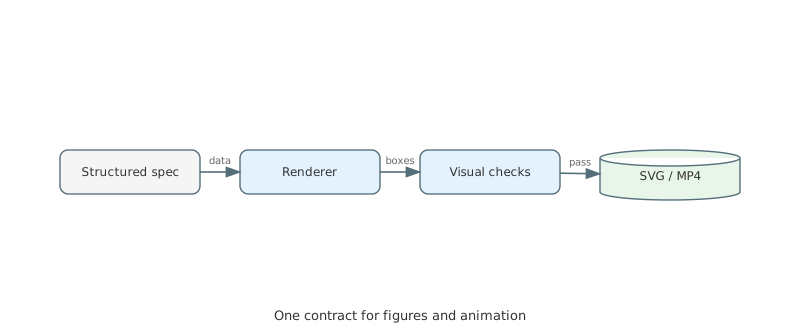
Straightedge generates deterministic, machine-checkable SVG diagrams from structured data — safe to commit, diff, and regenerate. The same input renders the same bytes on any machine. Draw one through the CLI or the MCP server and it comes back with its own legibility findings — labels that collide, or run off the canvas, reported with coordinates rather than left for a human to notice — and a compass-and-straightedge construction whose claims are false is refused rather than drawn.
Pure Python standard library: no Manim, no LaTeX, no browser, no network. A figure takes milliseconds.


Explore all figures and videos →
The constraint the whole library is built around: a visual can render successfully and still be wrong. Straightedge validates input before drawing, and reads its own output back as geometry afterwards — so a label that collides with another, or runs off the canvas, is a finding with coordinates rather than something a human has to notice.
There is also an animation lane — Manim scene builders that turn a plan or a prompt into an MP4. It is an addon in the real sense, not the packaging sense:
pip install 'straightedge[render]'installs Manim, and Manim then needs ffmpeg, a LaTeX distribution, dvisvgm
and the standalone document class on the host — none of which pip can put
there. A render costs about ten minutes of one CPU core. Every template in
list_templates says which lane it belongs to and what running it requires,
and the MCP server does not offer its render tool on a host that cannot run
it.

If you are here for diagrams, you do not need any of that, and the rest of this page is the figure lane.
pip install straightedgeThat is the figure lane, complete — only the Python standard library, nothing pulled in. The rest are extras:
pip install 'straightedge[render]'   # Manim animation → MP4
pip install 'straightedge[mcp]'      # MCP server, for driving it from an agent
pip install 'straightedge[stt]'      # optional speech-to-text adapter
From a checkout, for development:
python3 -m pip install -e '.[dev]'from pathlib import Path
from straightedge.diagrams import render_diagram
svg = render_diagram(
{
"type": "unit_circle",
"params": {"angle": 45, "show_triangle": True},
}
)
Path("unit-circle.svg").write_text(svg, encoding="utf-8")Four templates also accept a discoverable theme: roadmap can use
presentation or print-friendly, org_chart friendly or pastel,
unit_circle classroom or dark, and linked_list playful or dark.
professional remains the byte-identical default. The exact choices for each
template are published by list_templates(); see
docs/diagram-themes.md.
render_diagram() needs no browser, network, or headless renderer. An unknown
diagram type returns an empty string so a missing optional figure does not abort
an entire document build.
The registry currently contains 49 templates across several domains:
- Math and data: function graphs, coordinate planes, Riemann sums, unit circles, polar graphs, matrices, step functions, heatmaps, tables, and compass-and- straightedge constructions with exactly placed points.
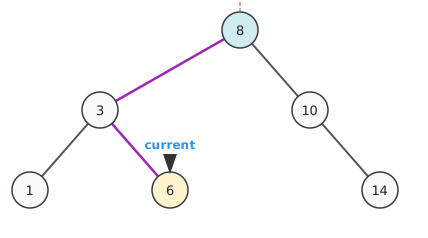
- Computer science: binary trees, linked lists, stacks, queues, hash tables, call
stacks, dynamic-programming tables, architecture diagrams, checked search
trees (BST, AVL, and left-leaning red-black), disjoint-set forests,
min-priority queues, planar embeddings, network flows, block-cut forests,
and equivalent graph representations. An
algorithm_tracecomposes these into a checked multi-step storyboard; a state machine isgraphwithdirectededges, not a template of its own. The samegraphtemplate supports checked bipartite layouts, computed degrees and paths for graph-theory lessons;graph_traversalcomputes complete, checked BFS or DFS storyboards with their queue or stack.animated_traceturns any checked figure sequence into a standalone animated SVG without Manim or ffmpeg.graph_algorithmcomputes Dijkstra, Bellman–Ford, Kruskal, Prim, topological order, strongly connected components, max flow with its min cut, greedy colouring, bipartite matching, König's vertex cover Euler circuits, and low-link connectivity (bridges, articulation vertices, and biconnected blocks) — and refuses, with the witness, what the graph makes false. - Projects and business: Gantt charts, calendar roadmaps, org charts, work-breakdown structures, project networks, timelines, flow diagrams, and T-accounts.
Inspect straightedge.diagrams.DIAGRAM_REGISTRY for the exact registered names.
Each renderer accepts a compact, serializable hint and returns a complete SVG
string.
The library is named after a tool it could not draw with until 0.4.0. This is that lane, and it is the one place where a figure can be refused for being mathematically false rather than merely illegible.
from straightedge.diagrams import render_diagram

svg = render_diagram({"type": "construction", "params": {
    "steps": ["A = 0, 0", "B = 1, 0", "( A B )", "( B A )", "[ C D ]", "[ A B ]"],
    "claims": [{"claim": "perpendicular", "of": ["[ C D ]", "[ A B ]"]}],
}})
( A B ) is a compass on A through B; [ A B ] is a straightedge across
them. Only A and B are given — C and D are where the circles cross, and
G is where the lines do. They are found, not placed, and they are exact:
G is (1/2, 0) and C is (1/2, √3/2), not values near them.
That is what makes the claims decidable. Ruler and compass reach exactly the
tower of quadratic extensions of the rationals, so straightedge.geometry.exact
implements that field rather than approximating it, and is_zero is a proof
with no tolerance in the path. Change perpendicular to parallel above and
nothing is drawn at all.
The vocabulary is on, collinear, parallel, perpendicular, congruent,
midpoint, equilateral, tangent, concurrent, ratio, golden and
harmonic. To see why exactness is the point rather than a flourish: a section
built on 1.618 is not golden, and every checker that compares a measured
ratio against a tolerance says it is.
from straightedge.diagrams.templates.construction import verify

verify({"steps": [...], "claims": [...]})   # findings, without drawing anything
See docs/construction.md
for the notation, the full claim vocabulary, and an honest account of what the
precision caps mean.
verify is the cheap step before the cheap step — it returns qc.Finding
values, so the CLI, the MCP tools and every existing consumer report them
unchanged. A claim that holds is silent; one that fails is an error; one that
could not be certified is a warn that says so, never a pass.
Every shipped animation is reachable by name, in any language, with no LLM — name a template and render it:
straightedge list-templates                                   # what exists
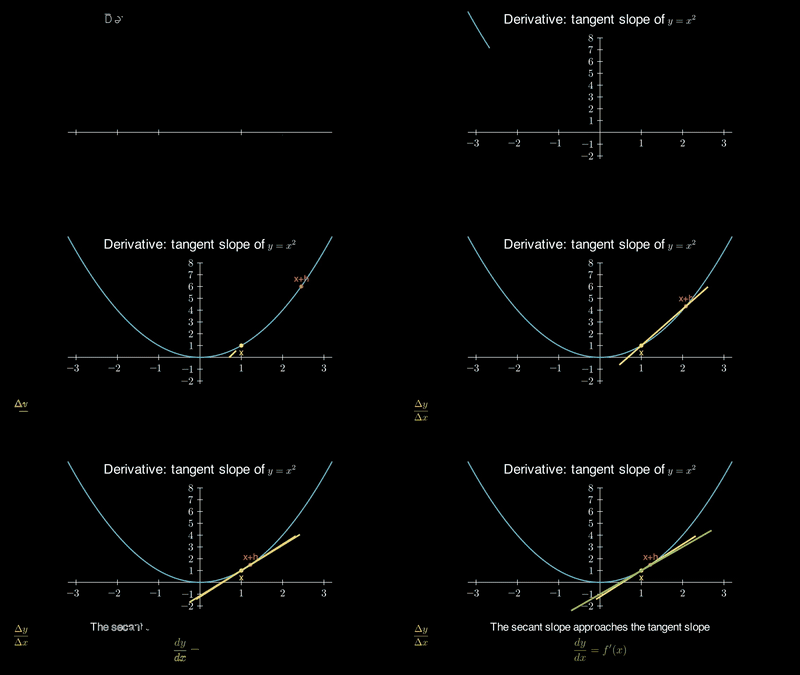
straightedge render --template calculus/derivative_tangent    # the hero animation, in English
straightedge render --template conic/ellipse_foci --qc        # and check the frame
straightedge render --template calculus/riemann_integral \
  --params '{"expression": "x**2 + 1"}'                        # refine with parameters
straightedge render --template graph/max_flow                 # a computed graph lesson;
                                                              # pass nodes/edges for your own graph
The graph topic — traversal, shortest path,
spanning tree, max flow — runs the algorithm at generation time on the graph
you pass and animates only the states it computed, one narration beat per
step; a graph that makes the claim false is refused before the render.
--template takes any id from list-templates and skips the keyword router
entirely — it is how the animations in the gallery above are drawn.
Every template in list-templates carries a worked example: arguments ready
to paste, type + params for a figure and template + params for an
animation, plus an example_request showing a phrasing that actually reaches
that template through the keyword router. They are checked by the test suite
rather than written by hand and hoped over — a figure example has to draw
something a bare call does not, and a request has to route where it claims.
A formula is another language-neutral path to the deterministic scenes:
straightedge render "y=x^2-4*x+3" --language enscaffold writes the scene without rendering; render streams Manim's progress
and prints the final media path — the usual low-quality output is
media/videos/scene/480p15/GeneratedScene.mp4.
The formula parser accepts y= and f(x)=, the variable x, arithmetic,
implicit multiplication, powers, common constants, and common elementary
functions. It validates expressions against a strict allowlist before generating
code.
Useful render controls:
# Vertical composition for short-form video
python3 -m straightedge.cli render "y=sin(x)" --aspect 9:16

# Match scene beats to externally produced narration
python3 -m straightedge.cli render "y=sin(x)" --beat-seconds beats.json

# Choose a Manim quality preset and media root
python3 -m straightedge.cli render "y=sin(x)" --quality m --media-dir build/media
--language {en,zh} controls on-screen labels; English is the default.
--aspect {16:9,9:16} changes both the composition frame and pixel resolution.
Beat files map IDs to durations, for example {"b01": 2.4, "b02": 3.1}.
The checks are deliberately usable without Manim. straightedge/qc.py works
against plain geometry values, so callers can apply the same policy to both
figures and scenes.
- Preconditions reject malformed or unsupported structured input.
- Diagram tests reject blank output and verify that meaningful data marks were drawn.
- Scene builders report overlaps, off-screen content, untranslated labels, and other visible risks as structured findings.
- Example simulations assert their mathematical or systems claim before they animate it.
The gallery labels those standalone dataflow examples separately because they are written by hand and do not use Straightedge's prompt pipeline. Their checks are useful demonstrations, not generated-library output.
Hand the renderer the measured length of each narration clip and every step runs for exactly as long as the sentence spoken over it:
straightedge render "riemann sum of x squared" --beat-seconds beats.json{ "b01": 3.4, "b02": 5.1, "b03": 2.8 }Straightedge does not synthesise speech — durations arrive as data, so the same
scene renders identically from a cloud TTS clip, a local model, or a human
recording, offline and without an API key. A step with no measurement keeps the
timing it was written with. See
docs/narration-timing.md for the walkthrough, the
two pacing helpers, and the silent failure worth knowing about.
For concepts outside the deterministic templates, straightedge/agent/ provides
a writer, reviewer, executor, and bounded repair loop against an OpenAI-compatible
API. See docs/agent-design.md for the design.
⚠️ This lane runs model-written Python. The generated scene is syntax-checked, scanned for disallowed imports and interpreter escapes, reviewed, and executed with a timeout — but that is defence in depth, not a sandbox. An allowlist over an AST is not a security boundary. Run the agent lane in a container or VM whenever the prompt or the model is untrusted. The deterministic template lane (render,--template) and the figure lane do not execute model output and carry no such caveat. SeeSECURITY.mdfor what is in scope and how to report an escape privately.
export OPENAI_API_KEY="..."

# Run it isolated when the input or model is not fully trusted:
docker run --rm --network=none -v "$PWD/out:/out" straightedge-render \
  agent-render "Show why the focal-distance sum of an ellipse is constant" \
  --language en --output-dir /out

# …or directly, only when you trust the prompt and the model:
python3 -m straightedge.cli agent-render \
"Show why the focal-distance sum of an ellipse is constant" --language enThe figure renderer, geometry checks, scene builders, and English output do not depend on Chinese input. The first natural-language teaching adapter was built for Chinese-speaking teachers, so its keyword planner and optional local Whisper transcription remain useful value-adds in the repository. They are one input adapter, not Straightedge's product boundary.
python3 -m straightedge.cli scaffold \
  "用单位圆展示正弦函数" \
  --language en
Audio transcription is local-only and opt-in:
python3 -m straightedge.cli plan --audio lesson.wavpython3 -m pip install -e '.[dev]'
python3 -m pytest -qThe gallery is a static GitHub Pages site under
site/, published at
https://scimigo.github.io/straightedge/. It intentionally
keeps the library-generated visuals separate from the hand-written, assertion-
backed examples.
| Contributing | CONTRIBUTING.md — how to add a template, and what a new one has to prove |
| Security | SECURITY.md — scope, and private disclosure for a sandbox escape |
| Release notes | CHANGELOG.md |
| Agent workflow | SKILL.md and examples/agent_loop.py — the render → read findings → repair loop, documented and runnable |
| Design notes | docs/ — agent interface, narration timing, QC sweep |
ManimCommunity/manimprovides the animation engine.makefinks/manim-generatorinspired the writer/reviewer/retry shape; Straightedge's agent implementation is written from scratch.ManimCommunity/manim-voiceoveris a natural future integration point for narration synchronization.