DEPRECATED
This gem is not supported and developed anymore.
--
Easy to use general purpose settings backend for activeadmin.
Add to Gemfile:
gem "activeadmin-settings"
Run installer:
$ rails g activeadmin_settings:install
Add i18n configuration to config/application.rb file:
config.i18n.default_locale = :en
config.i18n.available_locales = [:en, :ru]
Run migrations:
$ rake activeadmin_settings:install:migrations
$ rake db:migrate
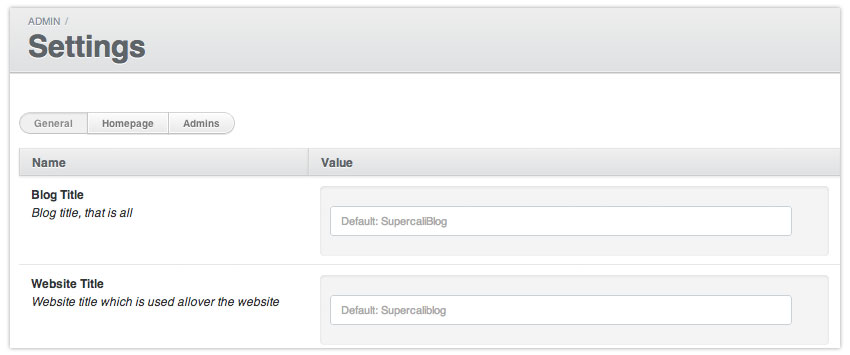
After installation you should find a new Settings menu in the admin. If no configuration found in config/activeadmin_settings.yml only Admins tab is shown. Admin tab implements basic functionality of editing AdminUser objects.
To add some settings go to config/activeadmin_settings.yml. Settings are splitted into groups, each setting name concidered to be uniq, e.g.:
SEO:
  Website Keywords:
    description:    These keywords are included in homepage header meta tag
    default_value:  lorem ipsum simply dummy text printing

  Website Description:
    type:           text
    description:    Website description is used as value for header meta tag on homepage
    default_value:  Lorem Ipsum is simply dummy text of the printing and typesetting industry. Lorem Ipsum has been the industry's standard dummy text ever since the 1500s, when an unknown printer took a galley of type and scrambled it to make a type specimen book.
All of the settings may be cplitted to groupes by adding optional param group, e.g.:
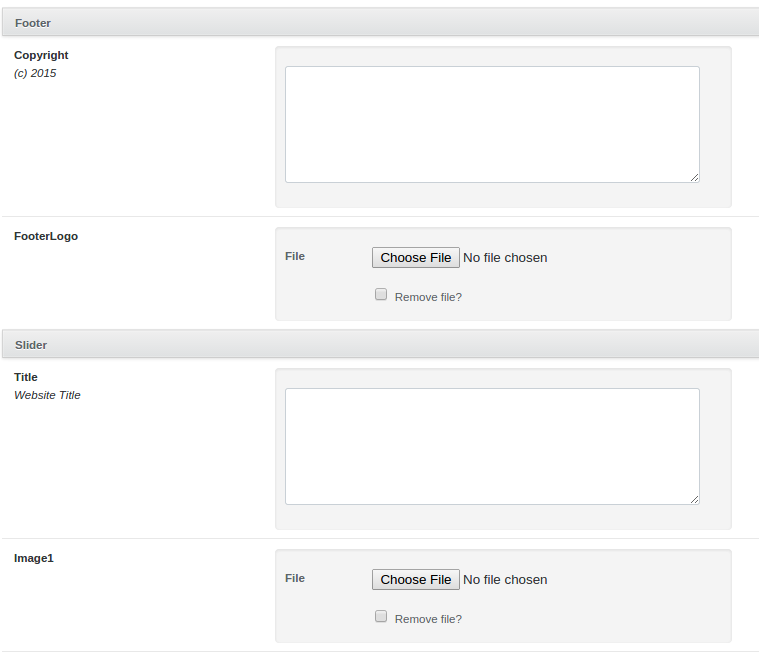
Site Wide:
  Title:
    type:           text
    description:    Website Title
    group:          Slider
  Image1:
    type:           file
    group:          Slider
  Copyright:
    type:           text
    description:    eg. (c) 2015
    group:          Footer
  FooterLogo:
    type:           file
    group:          Footer
As result we'll see:
There are a few types of settings:
string(default) - a regular text inputlink- text input with a format:(TITLE) URLtext- textarea inputhtml- textarea with redactor.jsfile- input for file upload
Some examples:
Types Examples:
  Logo Image:
    type:           file
    description:    Please make sure logo image size is 287x140 pixels
    default_value:  home/home-logo.jpg

  CEO Message:
    type:           html
    description:    This text is used for the "CEO Message" page
    default_value:  >
                      <p><strong>Lorem Ipsum</strong> is simply dummy text of the printing and typesetting industry.</p>
                      <p>Lorem Ipsum has been the industry's standard dummy text ever since the 1500s, when an unknown printer took a galley of type and scrambled it to make a type specimen book.</p>

  Facebook Link:
    type:           link
    description:    Company facebook page link
    default_value:  (Facebook) https://www.facebook.com/

Localization Example:
  Welcome title:
    type:           string
    description:    Localized welcome title
    default_value:
      en: English default title
      ru: Russian default title
      de: German default title
Settings could be integrated into templates as well as models or controllers code using settings_value helper. For example:
<%= settings_value("CEO Message") %>- provides html<%= settings_value("CEO Message", :de) %>- provides localized html for German language<%= image_tag setting_value("Logo Image") %>- provides an image url:<img src="/production-assets-path/home/home-logo.jpg" /><%= settings_value("Facebook Link") %>- provides link:<a href="https://www.facebook.com/" title="Facebook">Facebook</a>
If setting value is null or an empty string default setting value is used which is defined in config/activeadmin_settings.yml. If locale is not specified, default is used.
settings_value used to hit the database on every call, which adds up fast on a page that reads a few dozen settings. The whole settings table is now kept in a per-process snapshot, keyed by name and locale, and rebuilt once it goes stale.
The snapshot lives for 10 minutes by default. Set your own in an initializer:
# config/initializers/activeadmin_settings.rb
ActiveadminSettings.snapshot_ttl = 5.minutes
Saving a setting drops the snapshot in the process that saved it, so there the change shows up at once; other processes pick it up within the TTL. Reading a name that is not in the snapshot still falls back to the database, so settings keep registering themselves the first time they are read.
Set the TTL to 0 to switch caching off and read from the database on every call, the way it worked before:
ActiveadminSettings.snapshot_ttl = 0
I'm going to add types:
Boolean- checkbox or dropdown with two valuesDropdown- dropdown with optionsList- list bases selection