S E S S I O N S I N M I R R O R A R E C L O S E R T H A N T H E Y A P P E A R
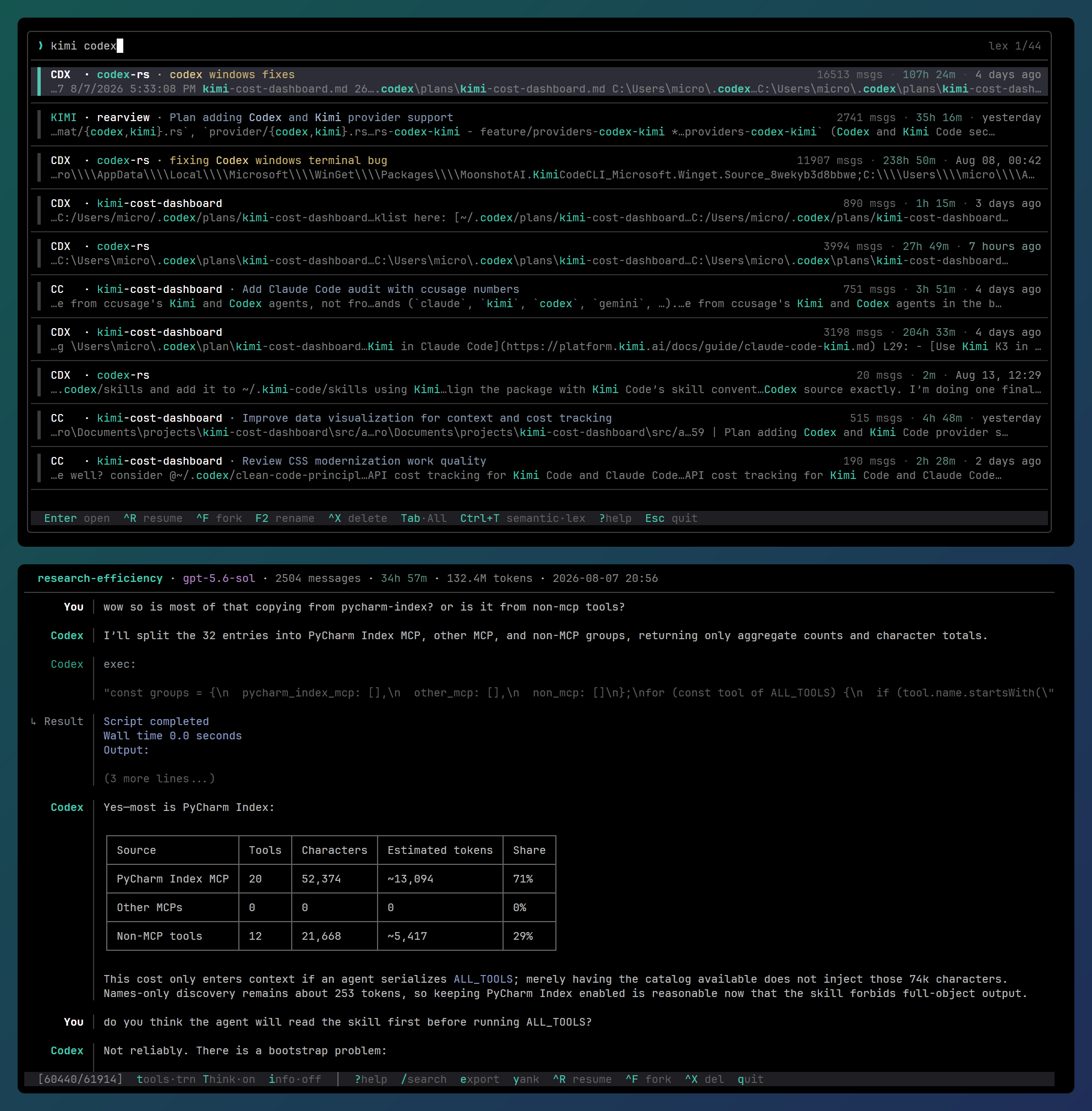
Search, read, and continue local coding-agent conversations from one terminal interface.
Note
rearview is a multi-provider fork of
raine/claude-history. The terminal
UI, lexical and semantic search, and the core design are raine's work; this
fork extends them to more coding agents.
rearview supports Claude Code, Codex,
OpenCode, Kimi Code, Pi, and
Oh My Pi (OMP). It finds their local histories automatically
and combines them in one list with lexical and semantic search.
Install · First run · Search · Read conversations · Manage sessions · Agent storage · Configuration · Automation · Changelog
| Agent | List label | Resume | Fork | Rename / delete |
|---|---|---|---|---|
| Claude Code | CC |
Yes | Yes | Yes |
| Codex | CDX |
Yes | Yes | Yes |
| OpenCode | OC |
Yes | Yes | Yes |
| Kimi Code | KIMI |
Yes | No* | Yes |
| Pi | Pi |
Yes | Yes | Yes |
| OMP | OMP |
Yes | Yes | Yes |
* Kimi forks start inside Kimi: resume the session, then run /fork.
Labels appear only when the list contains sessions from more than one agent.
curl -fsSL https://raw.githubusercontent.com/astral303/rearview/main/scripts/install.sh | bashrearview is not code-signed. macOS blocks programs downloaded through a
browser until you allow them, so if you take an archive from the
latest release instead
of using the script, clear the download mark on the extracted folder first:
xattr -dr com.apple.quarantine rearview-darwin-arm64rearview update fetches the program directly, so its updates are not marked.
With Scoop:
scoop bucket add rearview https://github.com/astral303/scoop-rearview
scoop install rearview
Scoop verifies the published download hash, adds rearview.exe to your PATH,
and updates it with scoop update rearview.
For a manual installation, download rearview-windows-amd64.zip and its
.sha256 file from the
latest release. Add the
extracted rearview.exe to your PATH.
rearview.exe is not code-signed. Windows marks files downloaded through a
browser, so SmartScreen warns when you start a marked, unsigned executable.
Before you extract the zip, remove its download mark and print its SHA-256 hash:
Unblock-File .\rearview-windows-amd64.zip
Get-FileHash .\rearview-windows-amd64.zip -Algorithm SHA256
Compare the printed hash with
rearview-windows-amd64.zip.sha256 from the release. rearview update fetches
the executable directly, so its updates do not have the browser download mark.
If Rust and Cargo are installed:
cargo install rearviewOn Linux this needs glibc 2.38 or newer, because of the search library it builds against. Ubuntu 24.04 and Debian 13 are new enough; Ubuntu 22.04 and Debian 12 are not, and the build stops at the linking step. The install script above downloads a prebuilt binary and works on both.
Confirm the installation:
rearview --versionUpdate the installed program:
rearview updateStart rearview inside a project:
cd /path/to/project
rearview
The list contains conversations from all known projects, newest first. The current directory defines the current workspace for filtering and cross-project forks.
- Type to search.
- Press
Enterto open a conversation. - Press
?to see the keys available on the current screen.
Press Tab to show only the current workspace. Use rearview -L or
rearview --local to start with this filter enabled.
For workmux users, the workspace filter
includes Claude sessions from the main repository and all its worktrees.
Sessions from other agents appear only when their recorded working directory
is the current directory. Worktree rows use the compact form
project/worktree.
| Goal | Command |
|---|---|
| Browse all known conversations | rearview |
| Start with the current workspace only | rearview --local |
| Show conversations from the last two days | rearview --since 2d |
| Open one JSONL transcript directly | rearview /path/to/conversation.jsonl |
| Select a conversation and print plain text | rearview --plain |
| Start with full tool details visible | rearview --show-tools |
| Start with thinking and subagents visible | rearview --show-thinking |
| Show all commands and options | rearview --help |
Lexical search is the default. It searches user messages, assistant messages, and tool results. All unquoted terms must match.
| Query | What it matches |
|---|---|
config |
config in any letter case |
api key |
Words separated by spaces or identifier punctuation, such as API_KEY |
auth |
Related prefixes, such as authentication and authorize |
red |
The word red, but not the same letters inside fired |
metrics "DEPLOYMENT_TOKEN" |
Flexible metrics plus the exact identifier |
Quoted lowercase text ignores case. Quoted text containing an uppercase letter
is case-sensitive. For example, "DEPLOYMENT_TOKEN" does not match
deployment token.
Identifier-style queries keep their underscores. api_key matches api_key,
but not api key.
Paste a session ID to filter the list to that session, then press Enter to
open it. The ID is highlighted once the list recognizes it. Quote the ID to
search for it as transcript text instead.
A session that a filter has hidden from the list is still found by its ID (except for Pi and OMP: the session must already be listed).
Matches in a title, project name, or summary count more than matches in body text. Newer conversations are boosted in ranking.
Use --since to set the start of a time range. Use --before to set its end.
--after is an alias for --since; do not use both in the same command.
rearview --since 2d
rearview agent search "cache invalidation" --since 1w
rearview agent search "cache invalidation" --after 2026-07-01 --before 2026-07-20| Form | Meaning |
|---|---|
45s, 30m, 3h, 2d, 1w |
Seconds, minutes, hours, days, weeks |
6mo, 1y |
Calendar months and years |
1d6h, 1mo2w |
Combined units |
2026-07-20 |
Midnight in local time |
2026-07-20T14:30 |
Local date and time; a space may replace T |
Long units such as 30minutes, 2days, and 6months also work. Units ignore
case. m means minutes; mo means months. Date bounds include the full unit
written, so --before 2026-07-20 includes all of July 20.
Filtering happens before ranking. Claude uses the transcript's modification time. The other agents use the latest user or assistant activity, then the session header time, then the modification time.
When the conversation list is filtered, ^L filters appears next to the result
count. Press Ctrl+L to see the active filters. ^L filters and the Ctrl+L
list also appear if an agent's sessions were ignored, and show how many and why.
Semantic search finds related ideas even when the wording differs. Press
Ctrl+T in the conversation list to switch between lexical and semantic
search.
The first semantic search may download a local model and build embeddings. Large histories take longer to prepare. Run this command in advance to build the semantic cache:
rearview --generate-semantic-cacheLexical results appear while semantic ranking runs. The semantic results replace them when ranking finishes.
Semantic queries can include exact text. For example,
deployment "DEPLOYMENT_TOKEN" requires the returned excerpt to contain that
exact identifier. A query with only quoted text returns exact matches, newest
first.
Start in semantic mode by default:
[search]
mode = "semantic"Press Enter to open the selected conversation, and q or Esc to return to
the list. The viewer renders Markdown, adapts to a light or dark terminal, and
uses a ledger-style layout.
Press ? in the app to pop up a list of keys applicable to the current
screen. The keys shown reflect all configured bindings.
The viewer's status bar reads tools·sum think·off info·on. The highlighted
letter in each is the key that toggles it.
Tool calls start in summary mode. Press t to cycle through:
- Summary — one condensed line for an activity or consecutive tool run.
- Truncated — the header and first body lines.
- Full — complete tool input and output.
Click a truncated call or result to expand only that item. A collapsed tool run
can also be expanded into its individual calls. With timestamps on (i), its
summary includes the total duration. In truncated and full mode, and inside an
expanded run, a thin line joins each call to its result, so a result that
arrived after another call's still reads as that call's; interleaved calls run
side by side, each in its own colour.
Use --show-tools or -t to start in full mode. Use --no-tools to start in
summary mode.
You can navigate by focusing on one message or tool call at a time. A teal ▌
marks the focused item. Inside an expanded tool run, the focused call carries
the ▌ marker, and the rest of the run carries a dim ▏.
J/Kor]/[enter message navigation and step between messages. In an expanded run, they step directly between a message and the nearest call; they do not stop on the whole run. Entering from above selects the first call, and entering from below selects the last. OneKreverses oneJat every step.Enterexpands or collapses the focused message's run.→expands a focused message's run or a focused call's output within the run.←reverses one level: it trims full call output, moves focus from a trimmed call to the whole run, or collapses the focused run to one row.ycopies the focused message as raw Markdown. On a call, it copies the header, full input, and full result. When the whole run is focused, it copies every call in that run. Outside message navigation, it opens a conversation copy menu with ledger, plain, Markdown, and JSONL formats./searches the conversation and focuses the message containing each match.nandNmove between matches; the status bar shows the current match and total.- Scrolling moves focus to the content on screen, one call at a time through an expanded run. A collapsed run has no calls to focus.
Escleaves message navigation.
Thinking and subagent activity are hidden by default. Press T or use
--show-thinking to display them. Subagent messages are dimmed and prefixed
with ↳.
Claude, Codex, OpenCode, and Kimi subagent activity appears inside the parent conversation. Availability varies by agent. Codex reasoning is usually encrypted; only rare plain-text summaries can be shown.
Use --plain to print Role: content text without Markdown rendering, ledger
formatting, colours, or line wrapping. This format is suitable for scripts and
language models.
When a selected conversation is printed to a terminal, rearview uses
less -R by default. Set PAGER to choose another pager, or pass --no-pager
to print directly.
To bypass the conversation list, open a JSONL file directly:
rearview /path/to/conversation.jsonl
rearview --show-tools --show-thinking /path/to/conversation.jsonl
Press q or Esc to close a directly opened file.
Remote clipboard actions use OSC 52, so copied text reaches your terminal
client. The terminal must allow OSC 52 clipboard writes. tmux also requires
set-clipboard to be on or external.
Set REARVIEW_CLIPBOARD when automatic transport detection is not suitable:
| Value | Behaviour |
|---|---|
auto |
Use OSC 52 for SSH and mosh; use the system clipboard locally |
osc52 |
Always send clipboard text through the terminal |
system |
Always use the clipboard of the machine running rearview |
osc52 is useful when a persistent tmux server has lost the SSH environment.
Your terminal's clipboard size limit still applies.
rearview uses each agent's own session commands and data files. Resume starts
the agent in the session's recorded directory. Fork starts the agent in your
current directory unless the table says otherwise.
| Agent | Fork behaviour | Delete removes |
|---|---|---|
| Claude Code | The same project uses Claude's native fork. A cross-project fork copies the session into the current workspace and leaves the original unchanged. | Every Claude transcript with the same session ID and its matching artifact directory |
| Codex | Codex's native thread fork | Every rollout for the thread and its sub-agent threads, and their session-index records |
| OpenCode | OpenCode's native --fork flag |
The session row and its sub-agent sessions; the database also removes their messages and parts |
| Kimi Code | Resume the session, then run Kimi's /fork command. |
The session directory and its session-index entry |
| Pi | Pi's native file-based fork | Only the selected JSONL file |
| OMP | OMP's native file-based fork | The selected JSONL file and its sibling artifact directory |
These commands open the conversation list and perform the action on the session you select:
rearview --resume
rearview --resume --fork-session
Kimi does not support --fork-session. Resume the Kimi session, then use
Kimi's /fork command.
[resume].default_args adds arguments when rearview resumes or forks a
Claude Code session. Other agents ignore it:
# ~/.config/rearview/config.toml
[resume]
default_args = ["--verbose"]
This example runs claude --resume <conversation-id> --verbose. It does not
change how Claude runs outside rearview.
Caution
Deletion changes the agent's history on disk. rearview has no undo. Back up
a session before deletion if you may need it again.
Interactive deletion requires confirmation. The table above lists the data that each agent loses.
To delete a Claude Code session by UUID immediately, without confirmation, invoke:
rearview --delete <SESSION_ID>Caution
This deletion cannot be undone.
delete-empty finds sessions the agent never answered, such as ones that
contain only a /status or /plugin command. It covers every agent, and the
summary counts them per agent so you can see whose sessions are listed.
Run the command without --yes first. This dry run lists every match without
changing anything. --local limits it to sessions recorded in the current
directory.
Caution
--yes asks each agent to remove its own session, so a Codex thread's older
rollouts and a Kimi session's whole directory go with it. rearview has no
undo.
rearview delete-empty
rearview delete-empty --local
rearview delete-empty --yesUse --show-id or --show-path, then select a conversation with Ctrl+O.
The list draws on standard error, and only the requested value goes to
standard output, so command substitution captures that value alone:
claude --resume "$(rearview --show-id)"--show-dir skips the list; it prints the Claude transcript directory for the
current working directory and exits.
Inside the viewer, press I to copy the session ID.
| Agent | Default location | Main override |
|---|---|---|
| Claude Code | Claude Code configuration directory | CLAUDE_CONFIG_DIR |
| Codex | ~/.codex/sessions |
CODEX_HOME |
| OpenCode | ~/.local/share/opencode/opencode.db |
OPENCODE_DB or XDG_DATA_HOME |
| Kimi Code | ~/.kimi-code/sessions and legacy ~/.kimi/sessions |
KIMI_CODE_HOME |
| Pi | ~/.pi/agent/sessions |
PI_CODING_AGENT_SESSION_DIR or Pi settings |
| OMP | ~/.omp/agent/sessions |
OMP profile and Pi-compatible environment variables |
rearview reads agent logs selectively. User and assistant messages and useful
tool output remain visible and searchable. Agent control records,
request framing, telemetry, and other runtime data are omitted when they are
not part of the conversation.
CLAUDE_CONFIG_DIR selects a non-default Claude configuration directory.
rearview ignores injected warmup exchanges with no user interaction and
sessions that contain only /clear.
Claude thinking and Task subagent activity are available through the thinking toggle.
Codex stores dated rollout files under ~/.codex/sessions. CODEX_HOME moves
the Codex home directory.
User and assistant messages and tool output are searchable. System and developer messages, injected environment context, compaction records, and telemetry are omitted. Inter-agent messages appear as tool calls but are not searched.
Codex stores thread names in session_index.jsonl. A rename in either Codex or
rearview is visible in both. If an undo leaves several rollouts for one
thread, only the newest appears. Subagent rollouts are folded into the parent
session and remain searchable. Archived sessions are ignored.
Codex can compress old sessions to .jsonl.zst files; the feature is
experimental and off by default in Codex. rearview does not support
compressed sessions yet: they are ignored, and Ctrl+L in the list and an
ignored warning in agent search output report how many.
Codex reasoning is encrypted. Only an occasional plain-text summary can appear behind the thinking toggle.
OpenCode stores sessions in
~/.local/share/opencode/opencode.db. XDG_DATA_HOME changes the data root;
OPENCODE_DB overrides the database path. rearview reads the database in
read-only mode, and a running OpenCode process does not block it.
User prompts, assistant text, and tool output are searchable. Reasoning can be
shown but is not searched. A file or MCP resource added with an @ mention
appears as an indexed read-tool call. Request framing, snapshots, patch and file
attachments, synthetic reminders, and editor context are omitted.
OpenCode subagents are child database sessions. They are folded into the parent session and remain searchable.
Kimi stores each session in its own directory under ~/.kimi-code/sessions.
rearview also checks the legacy ~/.kimi location. KIMI_CODE_HOME replaces
both roots.
Both wire layouts are supported:
agents/<agent>/wire.jsonl- Legacy
wire.jsonlat the session root
User prompts, assistant text, and tool output are searchable. Duplicate prompt
events are indexed once. Thinking can be shown but is not searched. Injected
<system-reminder> context, compaction records, model requests, and runtime
events are omitted.
Titles and working directories come from state.json. Subagent wires are
folded into the parent session and remain searchable.
Pi session discovery uses this precedence:
PI_CODING_AGENT_SESSION_DIRsessionDirin the current workspace's.pi/settings.jsonsessionDirin Pi's globalsettings.json- The
sessionsdirectory under the Pi agent directory
PI_CODING_AGENT_DIR selects the Pi agent directory and global settings file.
Workspace settings override global settings. An explicit session directory is
treated as a flat directory of JSONL files; the default root contains one
directory per project. Tilde paths, relative paths, and symlinked project paths
resolve as they do in Pi.
rearview supports Pi session versions 1 through 3. It follows the active
branch and omits abandoned branches and control records. Visible custom
messages remain. Images appear as placeholders instead of indexed base64 data.
OMP uses the same append-only conversation tree as Pi. Its default root is
~/.omp/agent/sessions.
Storage discovery supports:
PI_CODING_AGENT_SESSION_DIRfor a flat custom session directoryOMP_PROFILE, withPI_PROFILEas a compatibility fallbackPI_CODING_AGENT_DIRfor the default profile's agent directoryPI_CONFIG_DIRfor the OMP configuration root- An existing
XDG_DATA_HOME/ompdata root
A named profile uses ~/.omp/profiles/<profile>/agent/sessions, or the matching
existing XDG profile root. OMP sessions created with a one-time
omp --session-dir are found only when that directory is also supplied through
PI_CODING_AGENT_SESSION_DIR.
rearview follows the active OMP branch and omits abandoned branches. Title
records become the searchable session title. Mode, service-tier, credential,
reset, and extension records do not appear in the conversation or search
index.
The configuration file is ~/.config/rearview/config.toml. Create the directory
and file if they do not exist. Every setting is optional; command-line flags
override the file.
[display]
show_thinking = true

[search]
mode = "semantic"

[keys]
rename = "alt+r"

[tui]
exclude_projects = ["repo/worktree"]| Setting | Default | Effect |
|---|---|---|
display.no_tools |
true |
true shows summaries; false shows full tool details |
display.last |
true |
Show the last messages in list previews instead of the first |
display.show_thinking |
false |
Show thinking and subagent activity |
display.plain |
false |
Print plain text instead of ledger output |
display.pager |
Terminal-dependent | Use a pager when standard output is a terminal |
resume.default_args |
[] |
Pass these arguments when resuming or forking Claude Code |
The corresponding command-line overrides are:
--no-tools/--show-tools--last/--first--hide-thinking/--show-thinking--no-pager/--pager--plain
A key value can be ctrl+<key>, alt+<key>, one character, or f1 through
f12.
| Setting | Default key |
|---|---|
keys.resume |
"ctrl+r" |
keys.fork |
"ctrl+f" |
keys.rename |
"f2" |
keys.delete |
"ctrl+x" |
| Setting | Default | Effect |
|---|---|---|
search.mode |
"lexical" |
Start list search in lexical or semantic mode |
tui.exclude_projects |
[] |
Hide matching project names from browse and search lists |
Project exclusions are case-sensitive and match the displayed name in the
leftmost column. A parent such as "repo" also hides worktree rows such as
"repo/feature". Exclusion does not delete data. A full UUID or direct JSONL
path can still open an excluded conversation.
tui.semantic_search is a deprecated compatibility setting. It is used only
when search.mode is absent.
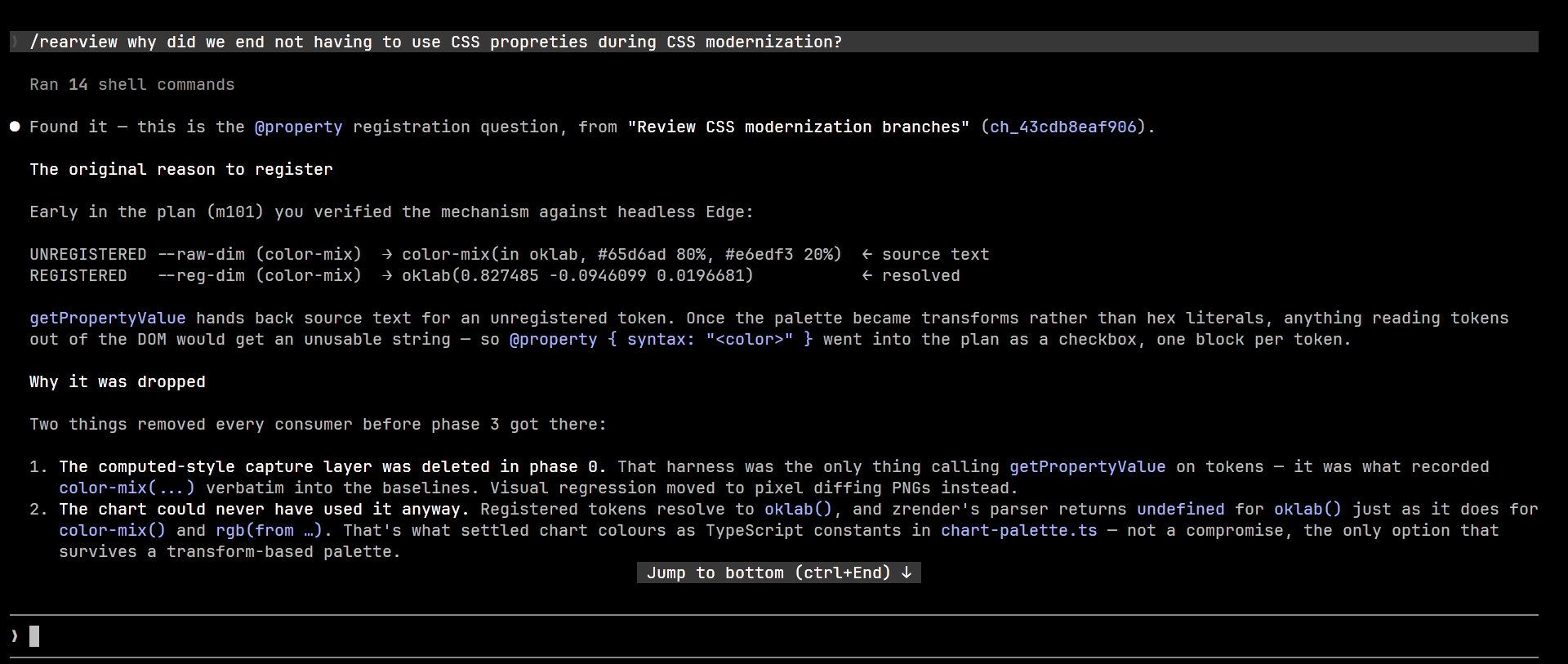
The companion Claude Code skill lets Claude search and read history from every supported agent. It can recover earlier decisions and implementation context without loading entire transcripts. See the skill for setup and commands.
For scripts, --plain writes the selected conversation as simple
Role: content text:
rearview --plain > conversation.txtUse the agent-oriented search command when a tool needs to search without the interactive browser:
rearview agent search "cache invalidation" --since 1wUse --show-id or --show-path when another command needs the selected
session's identifier or file path.
The binary, configuration and cache directories, and CLAUDE_HISTORY_*
environment variables were renamed to rearview.
On first start, rearview copies the old configuration to
~/.config/rearview/config.toml. It leaves the original file unchanged. To
keep the existing semantic-search cache, move ~/.cache/claude-history to
~/.cache/rearview; otherwise, rearview rebuilds it.
Tool versions are pinned in mise.toml and mise.lock. Install them with
mise:
mise install
just check
just check runs formatting checks, Clippy, tests, and a build in parallel
through checkle. It does not rewrite files.
Full logs are stored in target/check-logs.
Run one check with just format-check, just clippy, just test, or
just build. Clippy warnings do not fail the check; read
target/check-logs/clippy.log to see them.
Run just install-hooks to install a pre-commit hook that formats staged Rust
files and runs the same checks.
To add or change a provider, start with PROVIDERS.md.
rearview is a multi-provider fork of
raine/claude-history. This fork adds
Codex, OpenCode, Kimi Code, Pi, and OMP support, and makes opinionated
usability changes of its own.
- workmux — Git worktrees and tmux windows for parallel agent workflows
- git-surgeon — Non-interactive hunk-level Git staging
- consult-llm — Consult other language models from an agent workflow
- tmux-file-picker — Insert file paths through an fzf popup in tmux
- tmux-agent-usage — Show agent rate-limit use in the tmux status bar