A simple Markdown editor (HTML/JS/CSS) for easy embedding in PHP apps.
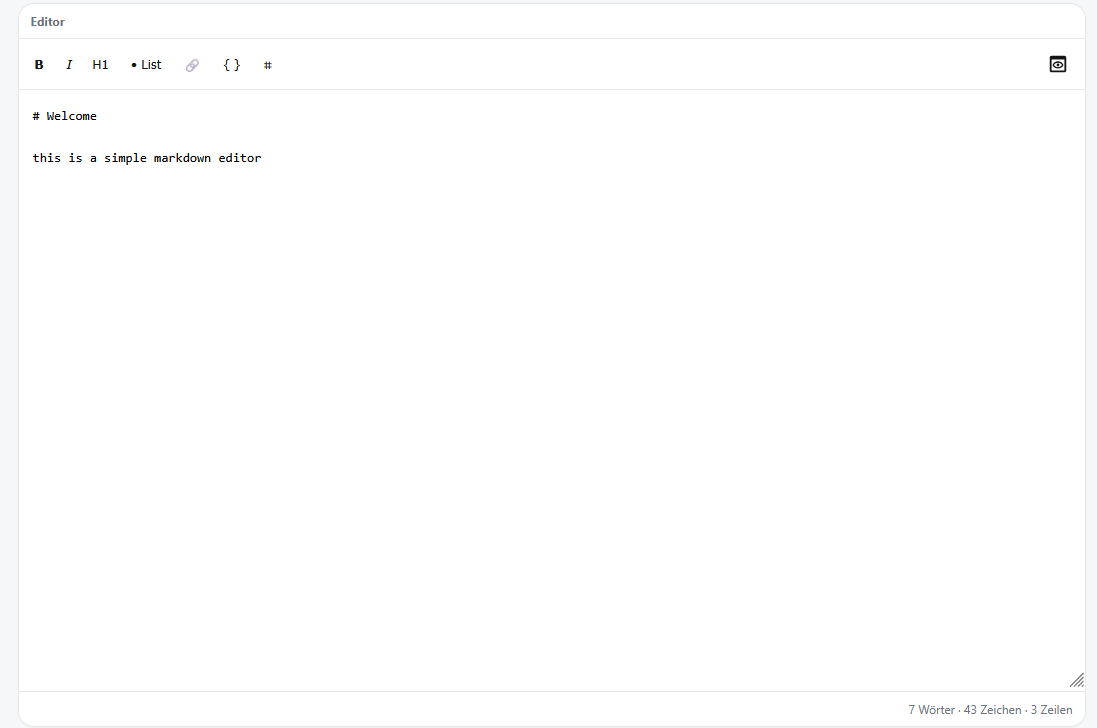
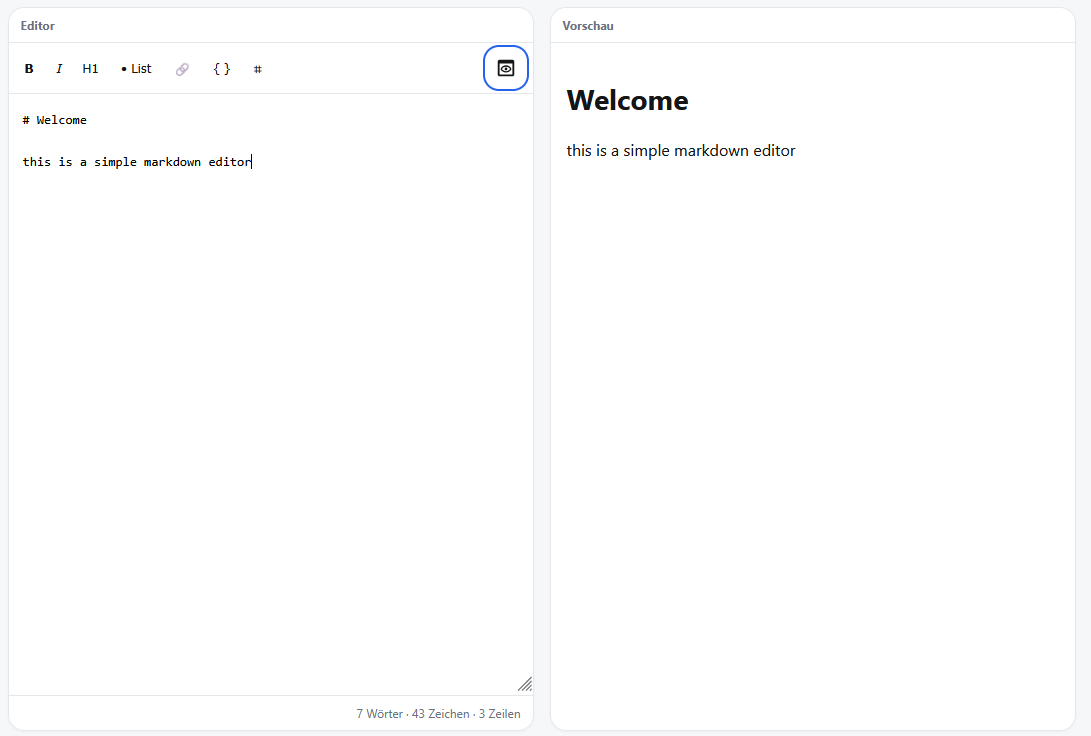
- PHP >= 8.1
Copy src/MarkdownEditor.php and public/markdown-editor.js into your project — no further dependencies required.
your-project/
├── public/
│   └── markdown-editor.js
└── src/
    └── MarkdownEditor.php
install via composer composer require cheinisch/markdown-editor
<?php require_once __DIR__ . '/src/MarkdownEditor.php'; ?>
<!DOCTYPE html>
<html lang="de">
<head>
    <?= MarkdownEditor::renderHead() ?>
</head>
<body>
    <?= MarkdownEditor::render() ?>
    <?= MarkdownEditor::renderFoot() ?>
</body>
</html>
if you using the composer version
<?php use cheinisch\MarkdownEditor\MarkdownEditor; ?>
<!DOCTYPE html>
<html lang="de">
<head>
    <?= MarkdownEditor::renderHead() ?>
</head>
<body>
    <?= MarkdownEditor::render() ?>
    <?= MarkdownEditor::renderFoot() ?>
</body>
</html>All options are optional.
<?= MarkdownEditor::render([
// Visible toolbar buttons.
// Possible values: 'bold', 'italic', 'underline', 'h1', 'list',
// 'quote', 'code', 'link', 'table', 'library'
// Default: all buttons
'buttons' => ['bold', 'italic', 'h1', 'list', 'link', 'table', 'library'],
// Auto-save content to localStorage.
// true → key 'markdown-editor-content'
// 'custom-key' → custom key
'localStorage' => 'my-editor',
// Sync content with an existing <textarea> by ID.
// If the element already exists in the DOM it will be used as-is.
// If it doesn't exist, the editor creates a hidden one automatically.
'field' => 'post_content',
// Directories for the image/file library modal.
// path – URL endpoint (GET = list files, POST = upload).
// Relative paths are resolved from the current PHP file.
// upload – true: enables drag & drop and upload button.
// recursive– true: includes subdirectories (?recursive=1).
'library' => [
[
'name' => 'All Images',
'path' => '/api/media/images',
],
[
'name' => 'Blog',
'path' => '/api/media/blog',
'upload' => true,
],
[
'name' => 'Archive',
'path' => '/api/media/archive',
'recursive' => true,
],
[
'name' => 'Downloads',
'path' => '/api/media/downloads',
'upload' => true,
'recursive' => true,
// Non-image files (PDF, DOCX …) are inserted as links: [name.pdf](…)
// Image files are inserted as: 
],
],
]) ?>Use MarkdownEditor::handleRequest() to handle image listing and uploads in a single file.
// e.g. /api/media/blog.php
<?php
require_once __DIR__ . '/../../src/MarkdownEditor.php';

MarkdownEditor::handleRequest(
    fsDirectory: __DIR__ . '/../../storage/media/blog',
    webPath:     '/storage/media/blog',
    options: [
        // Allowed MIME types for upload
        'types'          => ['image/jpeg', 'image/png', 'image/gif', 'image/webp'],

        // File extensions shown in the library
        // Default: jpg, jpeg, png, gif, webp, avif, svg
        'listExtensions' => ['jpg', 'jpeg', 'png', 'gif', 'webp'],

        // Max upload size in bytes (default: PHP upload_max_filesize)
        // 'maxSize' => 5 * 1024 * 1024,
    ],
);
GET /api/media/blog returns a JSON array:
[
  { "src": "/storage/media/blog/photo.jpg", "name": "photo.jpg", "width": 1280, "height": 720, "type": "image" }
]
POST /api/media/blog accepts a multipart/form-data request with a file field and returns the saved file as JSON.