ghee runs your GLSL headless on the GPU and puts the frames on an SPI/I2C panel, HDMI, image files, or an H264 stream. Multi-pass, Shadertoy-style, any Raspberry Pi.

ghee renders with GLES2 through DRM/GBM on a stock Raspberry Pi OS Lite image, HDMI takes direct scanout. ghee teaches no GLSL, The Book of Shaders and Shadertoy have that covered.
The Python package carries the whole renderer, panel drivers and console included. In a uv project, or any venv, on any 64-bit OS:
uv add ghee-render # or, in a venv: pip install ghee-render
A Pi with no venv takes the deb from the
releases page instead. It
installs the ghee command and the Python package in one, for the system
python, and it is the only path for the 32-bit Pis:
sudo apt install ./ghee_*.deb
Or build everything from source: Build.
| Hardware | OS | Driver | Hardware H264 |
|---|---|---|---|
| Pi 1, Pi Zero, Pi Zero W (armv6) | Raspberry Pi OS bookworm or trixie | vc4 | yes |
| Pi 2, Pi 3, Pi Zero 2 W (arm64) | Raspberry Pi OS bookworm or trixie | vc4 | yes |
| Pi 4, Pi 400 (arm64) | Raspberry Pi OS bookworm or trixie | v3d + vc4 | yes |
| Pi 5 (arm64) | Raspberry Pi OS bookworm or trixie | v3d + vc4 | ffmpeg/libx264 |
| Desktop Linux (x86_64) | any current distro | Mesa | ffmpeg/libx264 |
ghee runs on every Pi back to the Pi 1, and builds ship for all of them. Pi 1 through Pi 4 encode H264 on the Broadcom block. The Pi 5 has no encoder, so there and on desktop ghee encodes with ffmpeg/libx264, install it if needed:
sudo apt install ffmpeg
The build needs a Rust toolchain and the GLES/DRM development headers. On Raspberry Pi OS or Debian:
sudo apt install libdrm-dev libgbm-dev libegl1-mesa-dev libgles2-mesa-dev
cargo build --release
The --demo flag provides a set of builtin scenes.
Render one of the JSON scenes to an image sequence of sixty frames:
ghee render --demo mix -o frame.####.png --frames 60
Render one of the Python procedural scenes to a connected HDMI display and pass custom arguments:
ghee render --demo bluesun --display kms -- --emit 480x300
Write raw frames to stdout and pipe them through ffmpeg into an mp4,
with --timestep pinning engine time to a fixed 1/60 s step per frame:
ghee render --demo bars -o - --frames 300 --timestep 0.0166667 |
  ffmpeg -f rawvideo -pix_fmt rgba -s 320x240 -framerate 60 -i - out.mp4
Or stream it as a hardware accelerated H264 Annex-B stream and pipe it to mpv:
ghee render --demo trail --h264 - --fps 30 | mpv -
Or scan it straight out to the HDMI display, details in Hardware displays:
ghee render --demo trail --display kms
Or drive an SPI or I2C panel:
ghee render --demo trail --display st7789
Or serve the web console to preview and author all the demo scenes:
ghee serve --demo
And you can combine outputs: one render can write PNGs, drive a panel and
stream H264 at the same time, and --serve the authoring console on top:
ghee render --demo bars --display st7789 -o frame.####.png      # panel and a contact sheet
ghee render --demo bars --display st7789 --serve                 # panel, and edit it live
ghee render --demo bars --display kms --serve --host 0.0.0.0     # HDMI, edit from a laptop
A scene is a JSON file with an ordered list of passes, each with its own GLSL fragment shader.
This is bars.scene.json, one of the bundled examples:
{
  "version": 1,
  "passes": [
    {
      "name": "main",
      "shader": "bars.glsl",
      "arrays": [{ "name": "amplitudes", "size": 16 }],
      "params": {
        "base": { "type": "color", "value": [0.04, 0.04, 0.04] },
        "bar": { "type": "color", "value": [0.1, 0.9, 0.4] }
      }
    }
  ]
}
and bars.glsl next to it:
void main() {
  vec2 uv = v_texCoord;
  int last = amplitudes_size - 1;
  float fi = uv.x * float(last);
  int i0 = int(floor(fi));
  float h = mix(amplitudes_at(i0), amplitudes_at(min(i0 + 1, last)), fract(fi));
  float m = step(uv.y, h);
  gl_FragColor = vec4(mix(base, bar, m), 1.0);
}
A pass can also carry its GLSL inline in a "code" string, and a scene can
also be a program that emits its own JSON and feeds it data, see
Procedural scenes.
Your own scenes can be looked up through the $GHEE_SCENES env variable.
Careful: procedural scenes are executables, and ghee runs them, only put
directories you trust there.
The pass model follows Shadertoy. The passes render in order, each one a fragment shader drawing into its own buffer. A pass reads another pass through a numbered channel sampler: a channel on an earlier pass sees the current frame, a channel on the pass itself or a later one sees the previous frame. The last pass reaches the output.
Each pass renders at its own resolution, and samples another pass through normalized coordinates.
ghee compiles the GLSL of every pass behind a preamble like this one:
uniform float time;                 // seconds since start
uniform vec2  resolution;           // buffer size in pixels
varying vec2  v_texCoord;           // 0..1 across the buffer
// gl_FragCoord maps to the varying, so Shadertoy
// gl_FragCoord.xy / resolution math is exact

// declared array, e.g. {"name": "amplitudes", "size": 16}:
const int amplitudes_size;          // = 16
float amplitudes_at(int i);         // one element
float amplitudes_sample(float t);   // interpolated, t in 0..1, clamped edges
// arrays are bound as 1xN textures

// a 2D input, e.g. {"name": "text", "size": [96, 16]}:
float text_sample2(vec2 uv);        // bilinear, normalized uv
// the host feeds w*h floats: a mask, host-rasterized text, an image

// per channel: uniform sampler2D iChannel0..N
// per param:   uniform <type> <name>
// then the scene's common block, if it has one
A pass declares a channel by "buffer" name:
{ "name": "compose", "shader": "compose.glsl", "channels": [{ "buffer": "compose" }] }That pass samples its own previous frame through iChannel0:
// compose.glsl: everything drawn so far, fading a little each frame
void main() {
  vec3 prev = texture2D(iChannel0, v_texCoord).rgb;
  gl_FragColor = vec4(prev * 0.95, 1.0);
}
A param is a typed uniform declared on the pass, with optional range metadata:
{ "params": { "gain": { "type": "float", "value": 0.45, "min": 0, "max": 1, "step": 0.01 } } }The preamble turns that into uniform float gain;, and the console renders
every param as a live control. The types are float, int, bool,
color (a vec3 in the shader), vec2/3/4, and string. A string stays
on the host: the scene consumes it for work like rasterizing text, and
options turns its text box into a dropdown. A param declared on the scene
is shared, every pass reads the one value.
A procedural scene is an executable that supplies its own scene and data,
in any language, ghee starts it and talks to it over stdin and stdout.
docs/procedural.md holds the wire contract.
pip install ghee-render is that contract for Python: import ghee gives
Scene/Pass/Param to build the scene, @ghee.feed and @ghee.tick to
supply the data, and ghee.run for the loop. A PEP 723 scene declares
ghee-render inline under #!/usr/bin/env -S uv run --script.
The python shim lets you also run the python file to render directly:
./scene.py --output kms --frames 300.
ghee/examples/ holds bluesun.py and hero.py.
ghee serve <scenes_dir> starts the console on 127.0.0.1:8090: a
hardware accelerated live preview of the running scene, the GLSL of each
pass editable with compile errors inline, param sliders, pass muting and a
filter picker, and edits hot-reload into the running renderer.
See docs/http.md for its API.
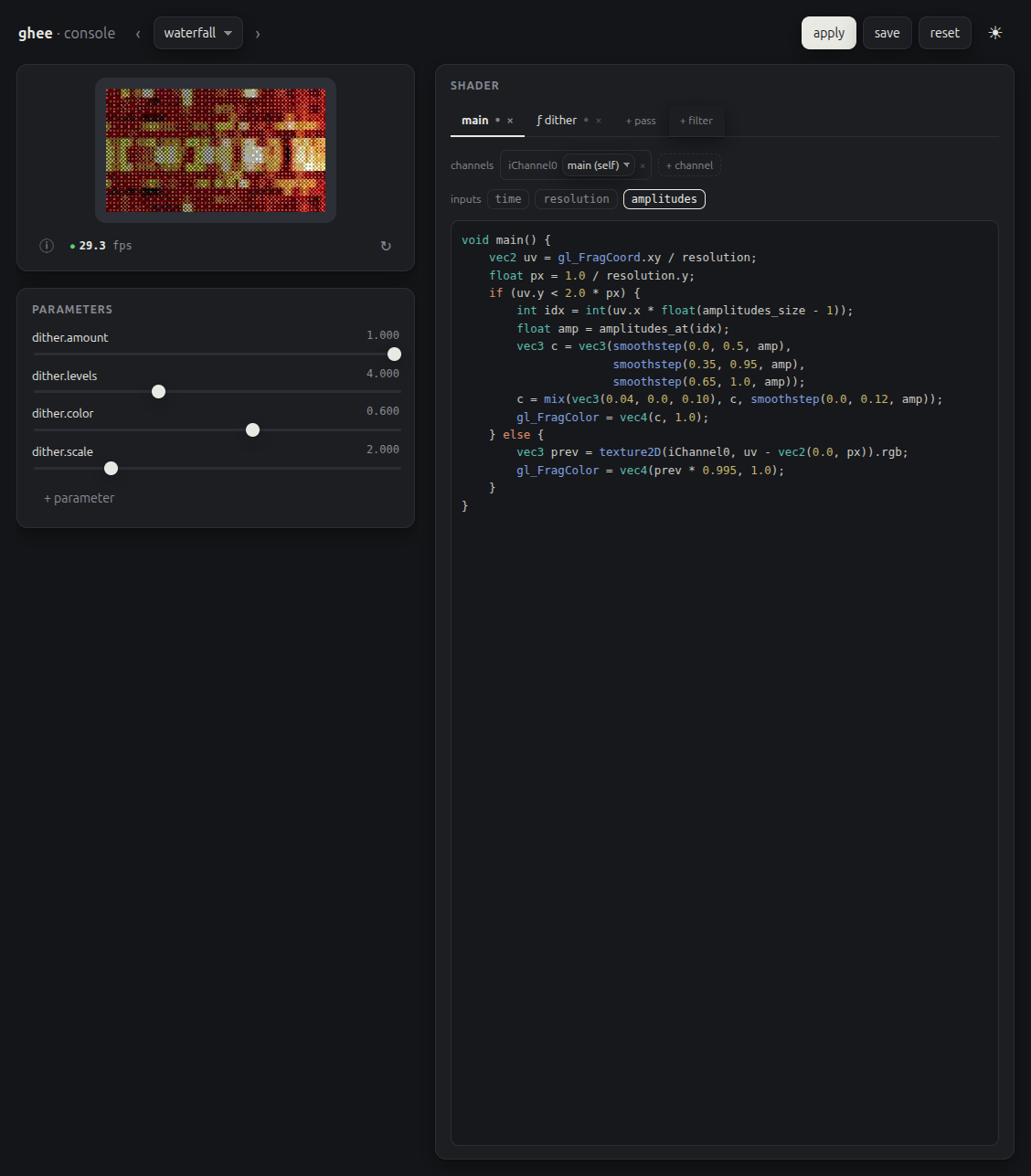
Careful: the console has no auth and compiles any GLSL posted to it, so it
binds loopback by default. --host 0.0.0.0 opens it to your network, do
that only on one you trust.
A filter is a named single-pass post process, appended after the scene's own passes. A scene can declare them:
{ "passes": [ ... ], "filters": ["dither"] }or the CLI can add them in order, after whatever the scene declares:
ghee render --demo bars --filters dither --display ssd1306
You can author your own <name>.filter.json files and add their
directories to $GHEE_FILTERS, colon-separated.
ghee isf import converts an
Interactive Shader Format shader into a ghee scene or
filter.
ghee isf import shader.fs                        # -> shader.scene.json
ghee isf import https://host/shader.fs -o s.json
ghee isf import shader.fs --as-filter            # -> shader.filter.json
ghee isf import shader.fs --size 640x480
ghee refuses three kinds of ISF:
FLOATpass buffers. ghee's pass buffers are 8-bit RGB.IMPORTEDexternal images. ghee scenes have no image inputs.- a vertex shader, or a body reading a varying. ghee's vertex shader is fixed.
ghee displays                      # list drivers, their options, and what works here
ghee render scene.json --display st7789
ghee render scene.json --display kms
ghee serve scenes/ --display st7789   # the console, driving the panel
kms is the connected HDMI display, or any KMS display.
The two bundled drivers are st7789 (configured for a 135x240 SPI LCD) and ssd1306
(configured for a 128x32 I2C 1-bit OLED). Extend either driver to your own
panel with --display-opts, which sets the driver's own options, for
example the Adafruit 1.3" TFT Bonnet, a 240x240 ST7789:
ghee render --demo bars --display st7789 \
  --display-opts width=240,height=240,x_offset=0,y_offset=80,backlight=26
Run ghee displays to list every option a driver takes, with its default.
ghee is a library and a command. A render takes three calls: load or build a scene, set it up, then render frames.
use ghee::engine::{Feed, Renderer};
use ghee::scene::{ArraySize, Scene};

let scene = Scene::load("bars.scene.json")?;
// width, height, components, DRI device (None probes), scanout, rgb565
let mut r = Renderer::new(320, 240, 4, None, false, false)?;
assert_eq!(r.setup(&scene)?, "");

let frame = r.render(Some(&mut |_name, size| match size {
    ArraySize::Linear(n) => Feed::Data(vec![0.5; n as usize]),
    ArraySize::Grid(w, h) => Feed::Data(vec![0.5; (w * h) as usize]),
}))?;
render takes one closure, which answers with the data for a named array.
The engine is thread-affine: build and use a Renderer on one thread.
- GLES2 only: no compute, geometry or tessellation shaders. VC4 also has
no derivatives (
fwidth) and no multisampled FBOs. - Everything except hardware H264 and KMS scanout reads the frame back with a blocking glReadPixels (GLES2 has no async readback), so bigger outputs cost more CPU.
--display kmsneeds its own card: if a compositor holds it, ghee cannot take DRM master.- The bundled panel drivers cover two controllers (
st7789,ssd1306).
A render says there is no GL device. Point the engine at the right
node with --dri or $GHEE_DRI, and add your user to the video group
(plus render on a desktop). ghee displays reports what works on the
host.
--h264 or the console stream says there is no ffmpeg on PATH. That
board has no Broadcom encoder, so ghee encodes with ffmpeg and libx264:
sudo apt install ffmpeg.
--display kms cannot take DRM master. Something else owns the card,
almost always a desktop session.
The console preview falls back to MJPEG in a browser that has
WebCodecs. H264 playback needs a secure context, 127.0.0.1 is one, a
plain-HTTP LAN address is not.
cargo test --release
cargo run --release -- golden --manifest tools/fixtures/golden/manifest.json
uv run --no-cache --with python/target/wheels/ghee_render-*.whl --with pytest \
    pytest python/tests
The render tests need a GPU node, and they skip cleanly without one. The
golden check renders the scenes the manifest names and compares the sha256 of each
frame against the pinned reference in tools/fixtures/golden/.
MIT.
