
A 2D platformer foundation written in C#, using WinForms and the built-in GDI+ graphics API. Demonstrates basic platform collision detection, interactive objects, simple gravity physics, and player movement.


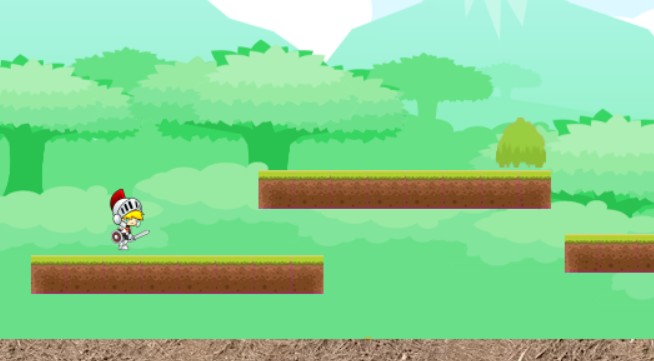
Started as an autonomous school project, this demonstrates how a basic 2D game can be built from scratch without any external libraries.
- 🎮 Smooth sprite animations for walking, jumping and attacking, with refined airborne state management
- 🎯 Precise collision detection with platforms and screen boundaries
- 🛠️ In-game platform builder: create, move, and delete platforms or bushes at runtime.
- 💾 All platforms and bushes you create are saved and restored at their exact positions on next launch, using basic level serialization
- 🌿 Interactive objects: bushes can be struck with a lightning effect
- 🌀 Side‑scrolling effect when reaching the left or right edge of the screen
- 🧩 Modular architecture for easy extension and maintenance
- 🌧️ Toggleable rain effect via the build menu.
- Sprite movement and animation consistency
- Platform collision from above and below
- Screen boundary enforcement
- Runtime object management (platforms and interactive elements)
- Level serialization and deserialization integrity — inserted objects persist across application restarts.
- Clone the repository with Git
- Open the '.sln' file in Visual Studio 2022
- Build the project with Ctrl+B and run it.
- left and right arrows keys : moving the sprite
- spacebar : jump
- Ctrl key : attack
- A and D keys : move the camera to the left/right
- B key : enable/disable build editor mode with menu.
While the build menu is open :
- left clic : select a solid object, then hold left to drag it anywhere on the form.
- delete key : delete selected object
- escape key or B key : close build menu and disable build editor mode.
Go to the Releases page to download a ZIP archive that includes a compiled x64 executable, for Windows 7 and later (x64-based).
- Three basic steps for using DrawImage: https://docs.microsoft.com/en-us/dotnet/framework/winforms/advanced/how-to-render-images-with-gdi
Only royalty-free resources were used in this project.