A simple GUI for selecting a DLL and displaying Steam/game process status. The former VAC3 patching feature has been removed.
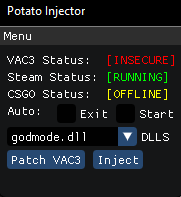
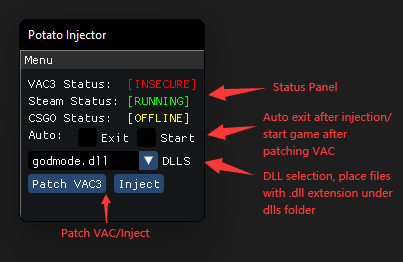
Basic Menu Layout & Explained
- Installed Microsoft Visual Studio 2019+
- Installed DirectX Software Development Kit
- BlackBone Static Library, build the project into
BlackBone.lib(Release build) andBlackBone-d.lib(Debug build) - Put both .lib files under
$(ProjectDir)\dependency\blackbone\Lib
- This injector uses
blackbone::Process::mmap().MapImage(which is a widely used manual map implementation) to map dll into target process memory.
- The former VAC3 patching feature and embedded patch payload are no longer part of the project.
- Put all .dll files in
dllsfolder(automatically created). - Select the dll to inject, make sure CSGO game is up and running, then click
injectto start injection. - Other labels and controls should be straightforward enough to comprehend.
- https://github.com/b1scoito/cozinha_loader From which I stole some readily available mapping and patching functions.
- https://github.com/ocornut/imgui
- https://github.com/DarthTon/Blackbone
- Use this injector at your own risk.
- Due to my current workload, I haven't been able to actively maintain this injector lately. Would greatly appreciate any PRs for bug fixes or new features. Contributors are more than welcome!
- Compatibility updates, now works on CS2 smoothly...
- For legacy CS:GO version, get it from Release v1.0 Executable(For CS:GO)
- Added custom process selection in v3.0