The Quick notes application is a tool to take quick notes (forgive the redundancy 😅) on small cards, organized by colors and tags. It supports basic rich text formatting such as bold, italic, and numbered or bullet lists to enhance your notes, and you can attach any file of your Nextcloud to them.
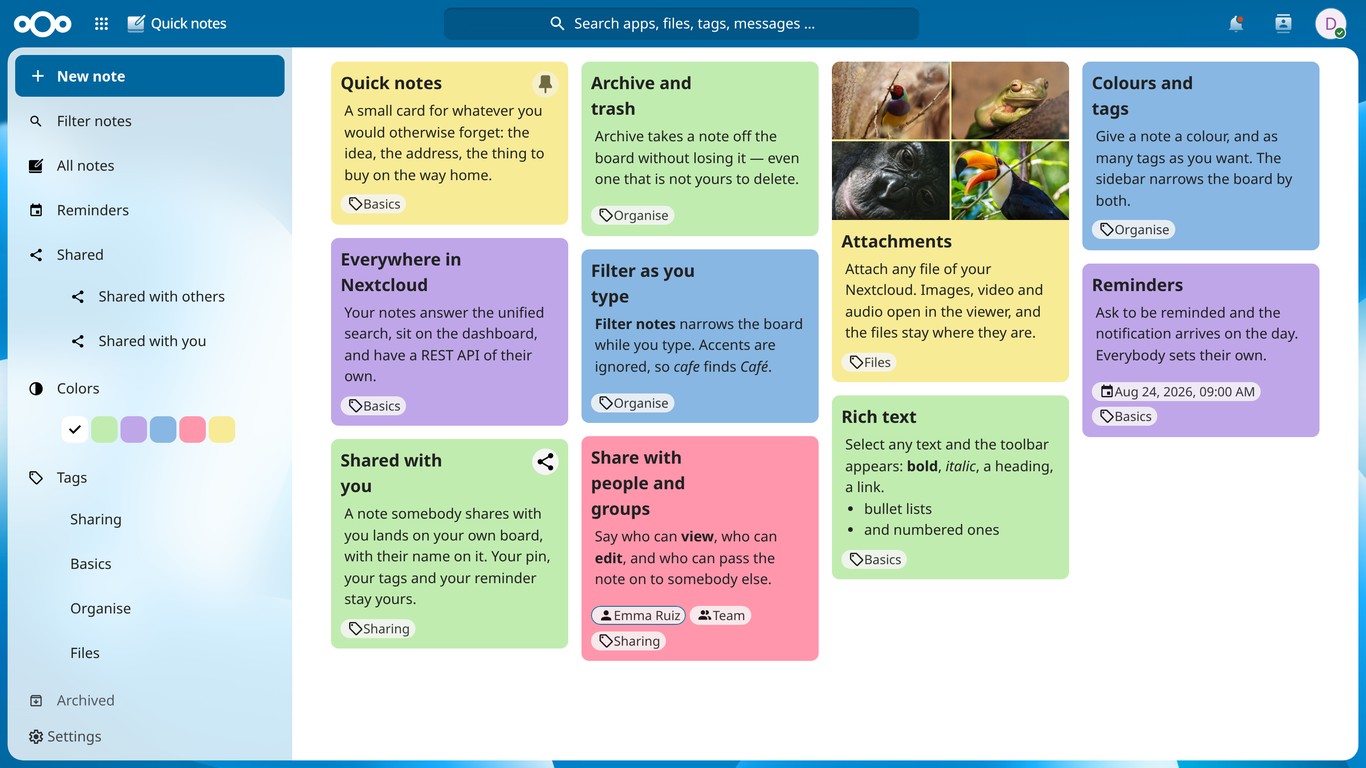
A note can be shared with other people and with groups, and every share says what it allows: can view, can edit, or pass the note on to somebody else. Editing a shared note is real collaboration — the title and the content are the same note for everybody — and if two people save at once, the second one is told about it instead of quietly overwriting the first.
The attachments travel with the note: whoever can see it can see them and download them, and images, video and audio open in the Nextcloud viewer. The files themselves stay where they are in your Files, and are not shared there.
Some things belong to the note, and some belong to whoever is looking at it. The title, the content, the colour and the attachments are the note's, the same for everybody. Your pin, your tags, your reminder and whether you archived it are yours: pinning a note somebody shared with you does not pin it for them, and two people can be reminded of the same note at their own time.
A note can carry a reminder, and Nextcloud sends you a notification when the date arrives. Anybody who can see a note can set one — including on a note that was shared with you to read.
If you turn it on in the app settings, your reminders are published as a read-only calendar too, so they show up in the Calendar app and in any CalDAV client you use.
The navigation narrows the board: by colour, by tag, by whether a note carries a
reminder, by who shared it. Filter notes does it by text as you type,
matching the title, the body and the tags, ignoring case and accents — so
cafe finds Café. Notes are indexed for the unified search of Nextcloud as
well, so you can jump to one from anywhere in your instance.
If you'd like to support the creation and maintenance of this software, please consider donating.



Quick notes is available in the Nextcloud App Store and can be installed directly from your Nextcloud instance by browsing to the Office category.
Nextcloud will notify you about available updates. Please have a look at CHANGELOG.md for details about changes.
Before reporting bugs:
- Make sure you are running the latest version of the Quick notes app.
- Consider also installing the latest development version.
- Check whether the issue has already been reported.
- Clone this repository into your Nextcloud
appsfolder:git clone https://github.com/matiasdelellis/quicknotes.git. - In a terminal, run
maketo install the dependencies and build the application. - Enable the app from the Apps management page of your Nextcloud instance.
A self-contained Docker environment is provided under the docker/
folder. See docker/README.md for details on how to spin up
a Nextcloud + MariaDB stack with this app mounted as custom_apps/quicknotes.
Join the project on https://www.transifex.com/matias/quicknotes/