






This repository contains the official implementation of the paper Stable Planning through Aligned Representations in Model-Based Reinforcement Learning, accepted to The third Reinforcement Learning Conference (RLC 2026).
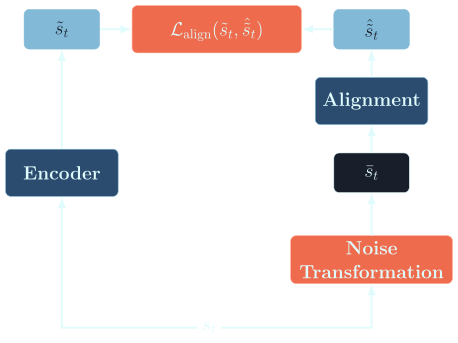
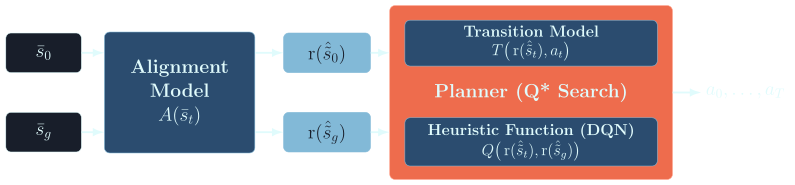
SPAR trains a discrete world model and a goal-conditioned heuristic from clean observations. It then trains an alignment model that maps transformed observations into the clean discrete latent representation. Then, the alignment model is used, along with the fixed world model and heuristic model, for planning.
SPAR uses Pixi for package and environment management.
git clone https://github.com/misaghsoltani/SPAR.git
cd SPAR
pixi install
pixi run spar --help
pixi run spar-experiments env=cube3
The dev environment includes the CLI and the repository quality tools. If the environment is active with pixi shell -e dev, run the same commands.
SPAR accepts Hydra configuration overrides. See the following examples.
First, you can activate the pixi environment using:
pixi shellThen, you can use the spar command:
spar env=cube3 stage=gen_data data.num_cpus=4 # or `pixi run spar env=cube3 ...` without environment activationAn experiment preset selects the environment, stage, and related configuration together:
spar +experiment=cube3/train_alignment_discAppend --cfg job --resolve to inspect a resolved configuration without running the stage:
spar +experiment=cube3/train_alignment_disc --cfg job --resolveThe following Cube3 sequence follows the data and model dependencies used by the paper. The experiment presets are stored in spar/configs/experiment.
-
First, activate the default pixi environment.
pixi shell # same as `pixi shell -e default` -
Generate the clean offline datasets.
spar +experiment=cube3/gen_offline
-
Train the discrete world model.
spar +experiment=cube3/train_env_disc
-
Train the goal-conditioned heuristic using the clean world-model data.
spar env=cube3 stage=train_heuristic
-
Generate the transformed offline datasets.
spar +experiment=cube3/gen_offline_sim2real
-
Train the discrete alignment model.
spar +experiment=cube3/train_alignment_disc
-
Test the discrete world model and alignment model.
spar +experiment=cube3/test_model_disc
-
Generate start and goal pairs for search.
spar env=cube3 stage=gen_search_data
-
Run one of the search stages after setting its model and pair-data paths.
spar env=cube3 stage=search_qstar
The commands above start their stages. To inspect any step first, append --cfg job --resolve.
The direct stage form is useful when changing paths, dataset sizes, or training settings:
# Generate data with a custom worker count.
spar env=cube3 stage=gen_data data.num_cpus=4

# Train the world model from the selected environment configuration.
spar env=cube3 stage=train_env_disc

# Train the heuristic.
spar env=cube3 stage=train_heuristic

# Run search algorithms.
spar env=cube3 stage=search_qstar
spar env=cube3 stage=search_gbfs
Use spar-experiments env=<name> to list the experiment presets available for an environment. Use spar --help to list stage groups and common Hydra flags.
Environment configurations are stored in spar/configs/env. The available environment names are:
cube3for Rubik's Cube 3x3x3sokobanicesliderdigitjump
Select an environment with env=<name>. Environment implementations are in spar/environments.
Configuraiton files can be found in spar/configs. Some of the main config groups are:
spar/configs/experiment: environment-specific experiment presets.spar/configs/stage: direct stage configurations.spar/configs/env: environment definitions.
The two main command forms are:
spar env=<environment> stage=<stage> [KEY=VALUE ...]
spar +experiment=<environment>/<experiment> [KEY=VALUE ...]
Nested values use dotted keys, for example train.lr=3e-4 or search.max_search_itrs=1000.
Run the repository checks from the Pixi development environment:
pixi run -e dev fmt spar
pixi run -e dev pyrefly check spar
pixi run -e dev ty check sparIf you use SPAR in your research, please cite:
@article{soltani2026stable,
  title   = {Stable Planning through Aligned Representations in Model-Based Reinforcement Learning},
  author  = {Misagh Soltani and Forest Agostinelli},
  journal = {Reinforcement Learning Journal},
  volume  = {7},
  pages   = {},
  year    = {2026}
}SPAR is released under the MIT License.
For questions about the repository, please contact Misagh Soltani at msoltani@email.sc.edu.