Welcome to Camera+!
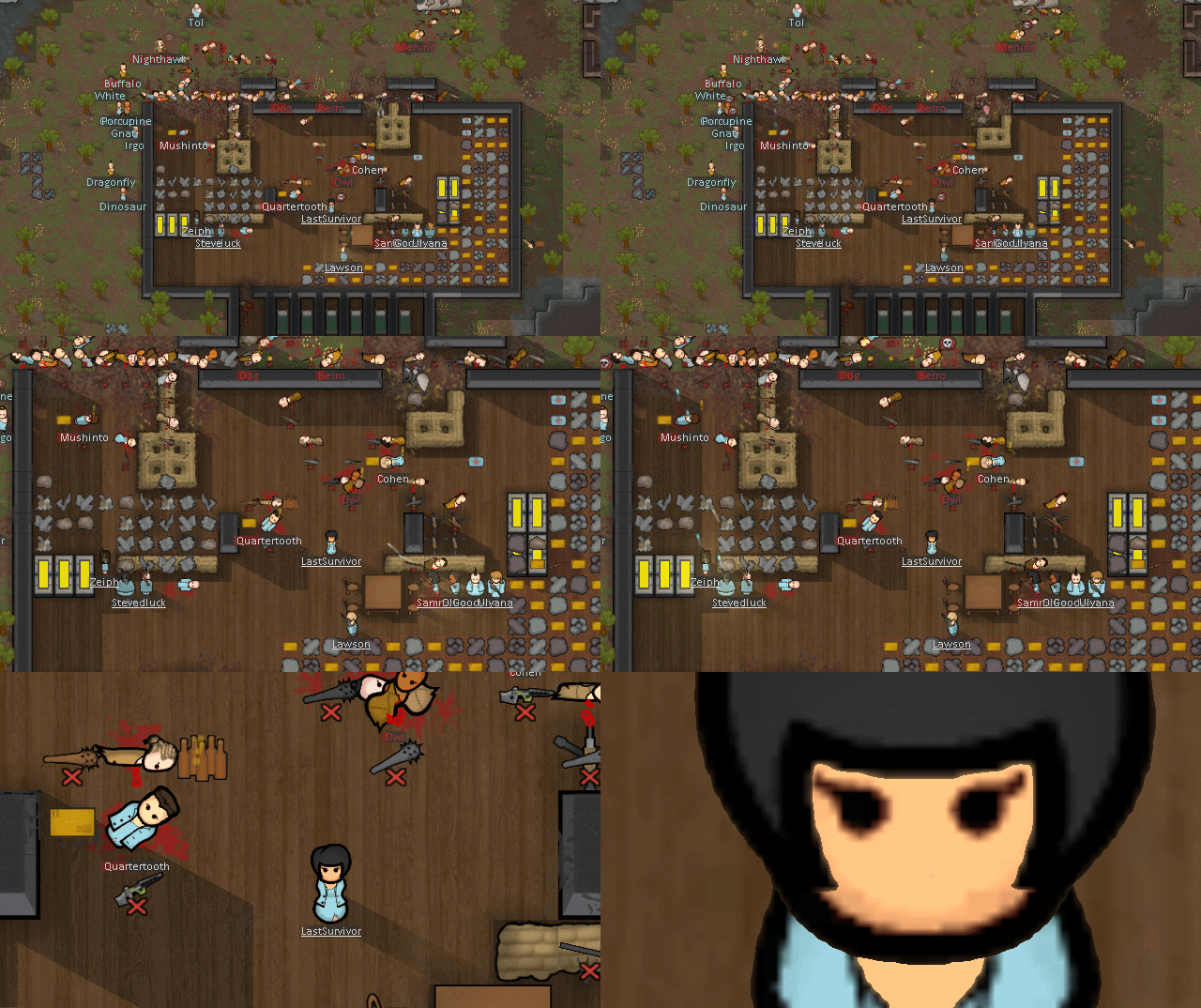
Camera+ extends RimWorld's camera zoom range, camera movement, and far-zoom marker rendering. It lets you zoom in for detail, zoom out for a strategic map view, tune movement at both ends of the zoom range, and replace far-away pawns with readable dots, silhouettes, edge indicators, or custom marker graphics.
Camera+ settings are organized by topic. Use All to see everything at once, or pick a left-side topic such as Zoom, Movement, Audio, Camera, Labels, Markers, Animals, Edges, Appearance, or Keyboard for a shorter page.
- Maximum zoomed in factor: Adjusts how close you can zoom in.
- Maximum zoomed out factor: Adjusts how far you can zoom out.
- Exponential zoom speed: Controls how the mouse wheel travels through the zoom range.
- Scroll speed for highest zoom factor: Defines movement speed when fully zoomed in.
- Scroll speed for lowest zoom factor: Defines movement speed when fully zoomed out.
- Edge scroll factor for highest zoom factor: Adjusts screen-edge scroll speed when fully zoomed in.
- Edge scroll factor for lowest zoom factor: Adjusts screen-edge scroll speed when fully zoomed out.
- Zoom to mouse: Keeps the map point under the cursor stable while zooming.
- Disable camera shake: Suppresses vanilla camera shake effects.
- Bring distant sounds closer: Makes map sounds feel closer when using far zoom levels.
- Mouse reveals labels: Temporarily restores hidden labels near the mouse.
- Hide pawn labels below / hide stack labels below / hide dead pawns below: Reduces far-zoom label and body clutter based on screen-cell size.

Defaults:
- Camera+ settings:
Left Shift+Tab - Load view:
Left Shift+1-9 - Save view:
Left Alt+1-9
The settings shortcut has a configurable main key and modifiers. Loading and saving views always use number keys 1 through 9 with configurable modifiers.
- Vanilla default: Original game markers for a familiar look.
- Camera+ dots: Custom dot markers for pawns, making it easy to differentiate between types.
- Camera+ silhouettes: Enhanced customizable silhouettes for a clearer visual representation.
- Show as marker below: Defines when Camera+ starts replacing pawn bodies with markers.
- Animals have the same marker: Consistent markers for all animals.
- Animals have a different marker: Different markers for different animals.
- Animals have no marker: Removes markers from animals.
- Include untamed animals: Toggles marker for untamed animals, keeping your wild fauna in check.
- Dot/silhouette size, edge dot size, edge distance, and outline width: Adjust marker appearance and edge-indicator placement.
- Add rules to customize pawn markers based on conditions.
- Combine tags to form "AND" conditions for precise control.
- Customize mode, colors, map markers, edge markers, mouse reveal behavior, marker threshold, size, and outline width for each rule.

- Use the "+" button to add tags, allowing you to create detailed rules for marker customization. The first rule that matches defines the marker style and sets the custom settings.
- Some tags have editable text parameters for even more specific conditions:

- Types: e.g., Animal, Human, Mechanoid to categorize pawns.
- Attributes: e.g., Attacking, Drafted, Injured to specify states and behaviors.
- Naming: e.g., Faction, Weapon to target specific names and types.

- Save and load marker-rule presets from the
CameraPlusfolder under RimWorld's save-data directory.
- Place custom marker graphics (
.pngfiles) in the sameCameraPlussave-data folder. - These files will be available in the "Mode" column context menu, allowing you to apply your custom graphics.

For detailed configuration, use the in-game settings menu and its help panel.
Powered by Harmony The runtime patch library for Unity