Vimliner is the simplest outliner for vim. It uses vim's existing code folding capabilities with some simple configuration. The result is a fast, powerful outliner using your favourite text editor.
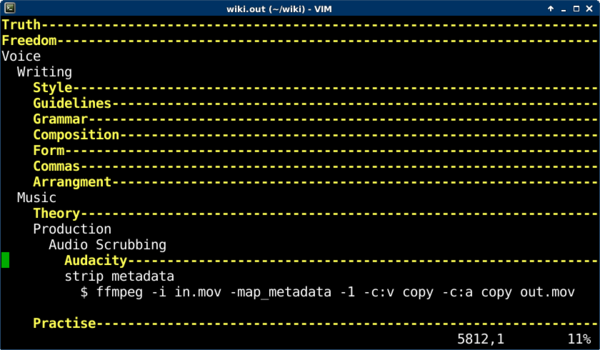
The outliner uses an indentation level of two white spaces to create new levels. You can use vim's default code folding shortcuts to move throughout your outline, or just use TAB to open and close levels.
The most frequent shortcut keys you will use are:
TAB open or close the current fold
zx close all other folds
dd to delete a fold (when it is closed)
[p to paste at the current indent level (use with dd to move outlines)
Use :help fold-commands in vim for additional shorcuts.
The fold function consumes blank lines. If you need to separate one fold from another, use a string of space characters that match the current indent level.
Install vimliner by saving vimliner.vim to $HOME/.vim/ftdetect/vimliner.vim on unix, or $HOME/vimfiles/ftdetect/vimliner.vim on Windows.
Save your outliner files with a .out extension for vimliner to be autodetected. Otherwise, use :set filetype=vimliner from within vim.
Since version 1.3, Vimliner includes the query functions below. The query results are displayed in a quickfix list in a separate tab, and you can easily jump to the matching lines by pressing Enter.
:Actionsshow a list of all current actions:Tomorrowshow a list of all tomorrow's actions:SubActionsshow a list of current actions under the fold at the cursor
The Action list is sorted by priority and duration (longest first).
Actions are defined with additional metadata separated by a colon. The format is priority.[duration].[date], where priority is a number from 1-5 (the highest priority being 1), the duration is a time in minutes, and the date is YYYYMMDD or YYYYMMDD_HHMM. E.g.
release vimliner : 2
release vimliner : 2.120
release vimliner : 2.120.20260723
Repeating actions can a frequency as a separate field before the priority. This field is not read by vimliner, but it is useful for planning.
stretch : every day : 1.15.20241120
cook a hot meal : every day : 1.45.20241120_1900
As you complete actions, you must update the next repetition date by hand (CTRL-A helps) and rerun the :Actions query.
- https://rogerkeays.com/vimliner
- https://github.com/rogerkeays/vimliner
- https://www.vim.org/scripts/script.php?script_id=5343
- 20241120_1.3 - added query functions and productivity features
- 20200430_1.2 - renamed to vimliner to avoid confusion with rival project
- 20200424_1.1 - allow lines containing only whitespace
- 20160305_1.0 - initial release
- Vimjournal: a simple text format for organising large amounts of information.
- Vimcash: an accounting system based on Vimjournal.
- More stuff you never knew you wanted.