


📖 Project page and screenshots
A fully local, cloud-independent Home Assistant custom integration for Narwal robot vacuums. Communicates directly with your vacuum over your local network via WebSocket — no cloud account or internet connection required.
This is an actively maintained continuation of sjmotew/NarwalIntegration, adding clean modes, zone cleaning, per-room cleaning, station controls, extra sensors, readable error states and a number of firmware-compatibility fixes. See What this fork adds and the CHANGELOG.
The map changed. If you use a map card or zone automations, read this before upgrading.
- 🗺️ The legacy 1:1
camera.*_mapentity is GONE. Only the high-resolutioncamera.*_map_hdremains. Any dashboard, card or automation pointing atcamera.*_mapwill break — repoint it tocamera.*_map_hd.- 📐
narwal.clean_zoneno longer accepts map-image pixel coordinates. Zones are now always robot world coordinates (what the map card sends withcalibration_source: {camera: true}). The oldcoordinatesfield is still accepted so your automations don't error, but it is ignored — a call that used to sendpixelswill now be treated as world and clean the wrong area.Migration: switch your map card to
camera.*_map_hdwithcalibration_source: {camera: true}(example below), and drop anycoordinates: pixelsfrom yourclean_zonecalls. Deprecation was announced in 1.6.0. Staying on the old map? Pin the integration tov1.6.0in HACS.

This integration uses a local WebSocket connection on port 9002. Only models that expose this port are supported.
The only fully supported and actively maintained model is the Narwal Flow — it is the one I own, develop against and test every release on. The other models below are marked probably working: they worked on the original upstream integration before this fork, but I cannot re-test them, so this fork's newer features and fixes are unverified on them. Reports (positive or negative) are very welcome.
| Model | Status | Notes |
|---|---|---|
| Narwal Flow (AX12) | ✅ Fully supported | The one supported and maintained model. All features developed and validated here, on firmware up to v01.08.03. |
| Narwal Flow 2 | 🟡 Probably working | Worked on the upstream integration before this fork; not re-tested here. Room labels use Flow 2 names (upstream #22). |
| Freo Z10 Ultra (CX4) | 🟡 Probably working | Community-confirmed on the upstream integration before this fork; not re-tested here. |
| Freo X10 Pro (AX15) | 🟡 Probably working | Community-confirmed on the upstream integration before this fork; not re-tested here (upstream #12). |
| Freo Z Ultra (CX7) | ❌ Not compatible | Port 9002 open but no local broadcasts; cloud-only (upstream #5) |
| Freo X Ultra (AX18/AX19) | ❌ Not compatible | Uses ZeroMQ (port 6789) + Tuya cloud, not WebSocket (upstream #4) |
| Freo X Plus | ❌ Not compatible | Cloud-only — no local API |
| Narwal J-series (J1/J4/J5) | ❌ Not compatible | J1: HTTP-only (port 8080); J4/J5: cloud-only (Tuya) |
Models marked Not compatible use a different protocol or are cloud-only. This is a hardware/firmware limitation.
Other models? Check with nmap -p 9002 <your-vacuum-ip>. If open, open an issue with your model and results.
- Start / Stop / Pause / Resume — all commands validated on hardware
- Clean modes — vacuum, mop, vacuum + mop, or vacuum then mop (sequential two-pass)
- Room cleaning — clean selected rooms via the
narwal.clean_roomsservice or a map card - Zone cleaning — draw arbitrary rectangles on a map card, robot cleans just those
- Return to dock / Locate (robot announces "Robot is here")
- Fan speed — Quiet, Normal, Strong, Max (set-only; robot doesn't broadcast current level)
- Buttons: wash mop, dry mop, empty dustbin, wake robot
- Mop humidity select (dry / normal / wet)
- Station activity sensor (idle / mop washing / mop drying / dust emptying)
- Battery level, cleaning area, cleaning time, firmware version
- Cleaning progress (% while cleaning), dust bag health
- Error sensor with readable states — 48 known Narwal fault codes translated to
English / French / Polish, with
code,code_hex,help_url,messageandseverityattributes for automations - Docked (binary sensor), charging state (Charging / Fully Charged / Not Charging)
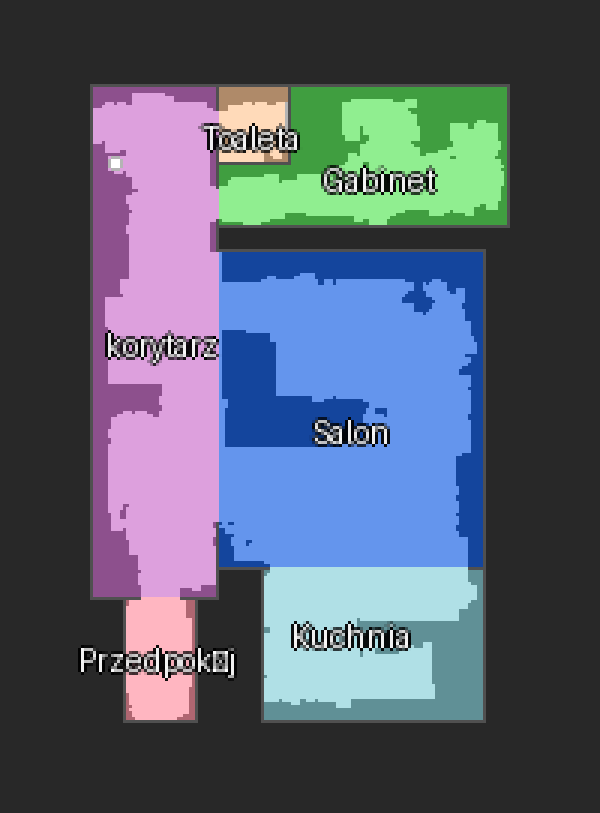
The camera.*_map_hd entity renders the robot's map: the grid is upscaled
4× by default (configurable 2–6× in the integration options) with crisp
NEAREST-upscaled rooms, anti-aliased vector overlays, and a real
calibration_points attribute for map cards.
The legacy 1:1
camera.*_mapentity was removed in 2.0.0 — see the migration note.
Layers drawn on the map (each toggleable with a switch entity):
- Color-coded floor plan with room labels (user-named and auto-generated)
- Furniture from the robot's stored map — rotated outlines with a translucent fill and collision-avoiding labels
- Robot trail — the robot's own recorded path (display_map rail midline), with the freshest tail reconstructed from live positions
- Cleaned area — the freshly vacuumed 11.4 cm track exactly as the robot reports it (the strip between the display_map "rails")
- Lidar cells — wall/obstacle cells the robot actually measured while driving. Carpet-flagged cells render as a light tint above the floor (like the Narwal app); wall-adjacent cells take the wall shade; free-standing detections are minimally darker. Carpet persists across sessions
- Planned path — the thin line showing where the robot is about to go
- Active zone overlay — rectangles sent via
narwal.clean_zone - Dock marker and live robot position (~2 s refresh; positions fall back to the planned-trajectory head during display_map dropouts)
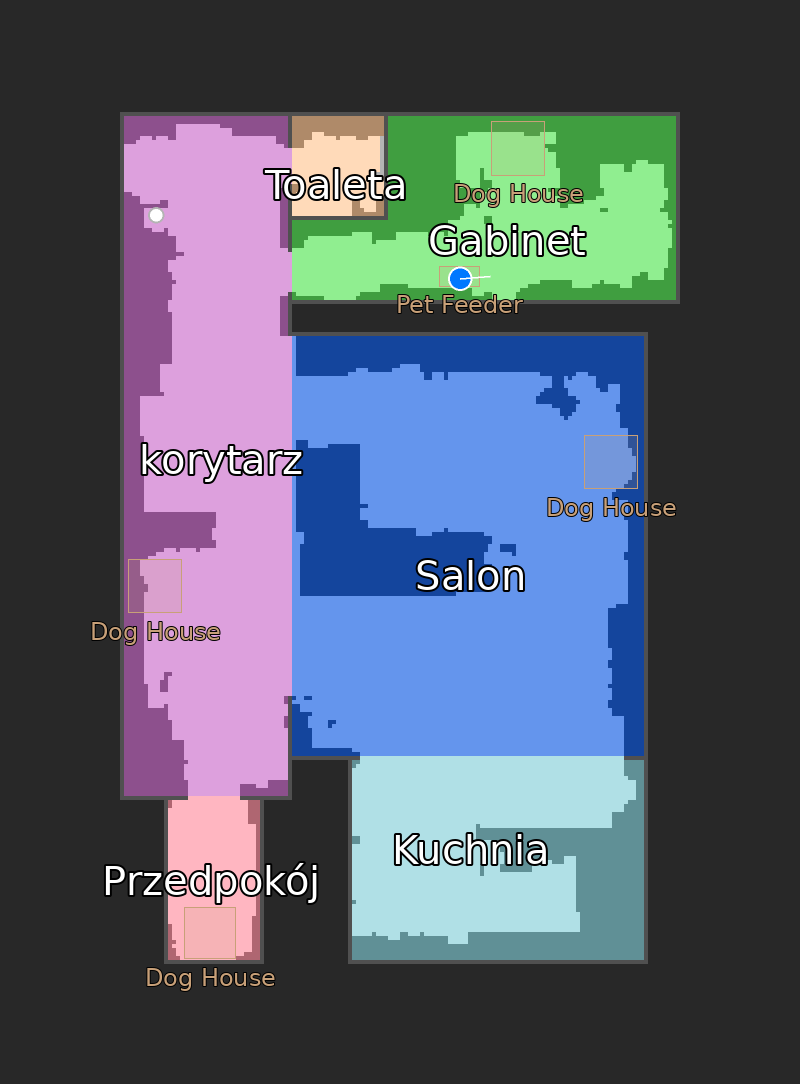
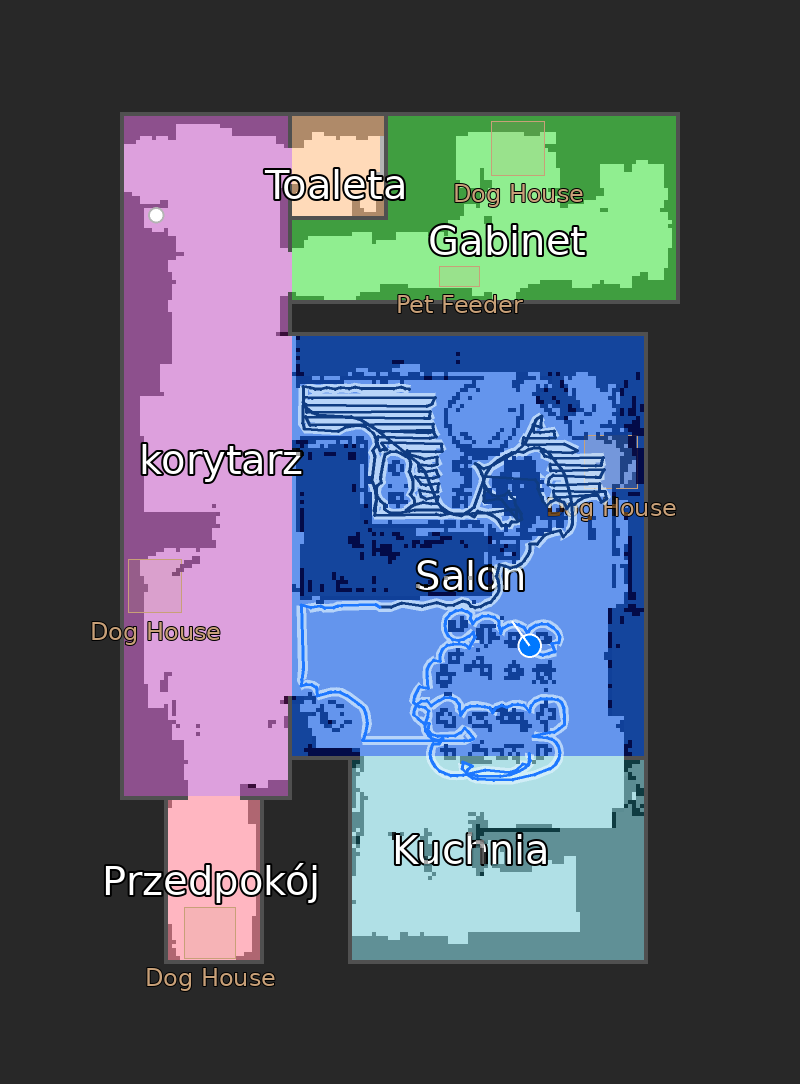
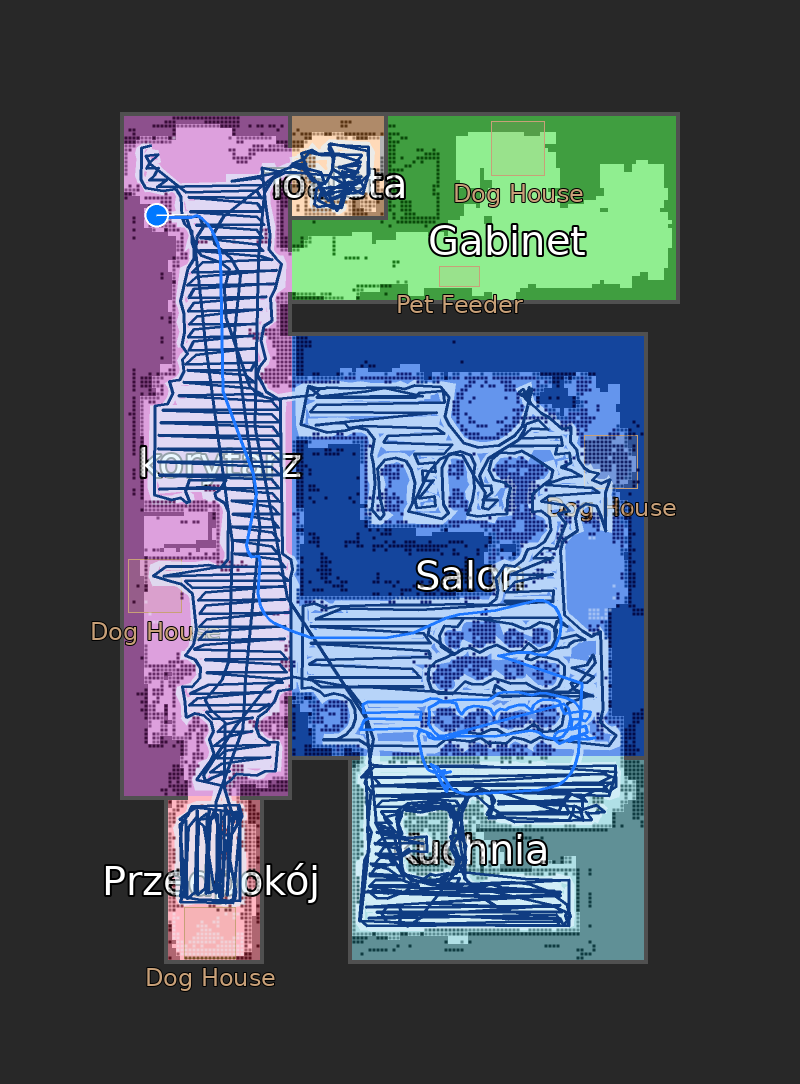
Left: idle floor plan. Middle: early in a clean — trail, vacuumed strip, planned path and lidar wall marks. Right: the same map late into a whole-house run, with every layer accumulated.
The map layers accumulate during a clean but are drawn incrementally so per-frame render cost stays flat regardless of session length — see Map rendering performance for the stress-test results.
- Real-time WebSocket push updates, auto-reconnect with exponential backoff
- Wake system for sleeping robots + keepalive heartbeat
- 60-second polling fallback
Everything below is on top of upstream v1.0.0 — see the CHANGELOG for the exact history:
| Area | Additions |
|---|---|
| Cleaning | Clean-mode select (incl. sequential vacuum then mop), narwal.clean_zone (rectangle zones with auto-generated coverage path), narwal.clean_rooms (per-room by segment id), whole-house cleaning honoring the selected mode — all via clean/start_clean, the only command path recent firmwares actually honor parameters on |
| Station | Wash mop / dry mop / empty dustbin / wake buttons, mop-humidity select, station-activity sensor |
| Diagnostics | Error sensor with 48 fault codes translated to readable states (EN/FR/PL), dust-bag health, cleaning progress |
| Map | High-resolution Map HD camera (configurable scale, anti-aliased overlays, Polish-diacritics-safe bundled font, calibration_points for map cards), robot-recorded trail + freshly vacuumed strip, planned-path line, lidar wall marks, rotated & filled furniture with collision-avoiding labels, active-zone overlay, per-layer visibility switches |
| Robustness | narwal.resume service (recovers false "robot lifted" pauses), correct docked/paused detection on firmware v01.08.03+, map_id parsing fix (vacuum.start crash) |
| Localization | Full Polish translation |
Or manually:
- Open HACS > three-dot menu > Custom repositories
- Add:
https://github.com/sytchi/NarwalIntegration(type: Integration) - Find Narwal Flow Robot Vacuum and click Download
- Restart Home Assistant
Migrating from upstream? This integration uses the same
narwaldomain — remove the upstream custom repository in HACS, add this one, redownload, and your existing config entry and entities keep working.
- Copy
custom_components/narwal/to your HAconfig/custom_components/directory - Restart Home Assistant
- Settings > Devices & Services > Add Integration > search "Narwal"
- Enter your vacuum's IP address and select your model
- Entities are created automatically
Tip: Assign a static IP to your vacuum in your router.
After setup, open the integration's Configure dialog to adjust:
| Option | Default | Description |
|---|---|---|
map_scale |
4 | Upscale factor for the HD map camera (2–6). Higher = sharper image, more CPU per render. |
| Entity | Type | Notes |
|---|---|---|
vacuum.* |
vacuum | start / stop / pause / return / locate / fan speed |
camera.*_map_hd |
camera | high-resolution live map (all layers, calibration_points) |
switch.*_draw_trail, *_draw_cleaned_area, *_draw_furniture, *_draw_lidar_walls |
switch | map layer visibility (restored across restarts) |
select.*_clean_mode |
select | sweep / mop / sweep_mop / sweep_then_mop |
select.*_mop_humidity |
select | dry / normal / wet |
button.*_wash_mop, *_dry_mop, *_empty_dustbin, *_wake_robot |
button | station commands |
sensor.*_battery, *_cleaning_area, *_cleaning_time, *_firmware_version |
sensor | basics |
sensor.*_cleaning_progress |
sensor | % — only while cleaning |
sensor.*_dust_bag_health |
sensor | 100 = healthy |
sensor.*_station_activity |
sensor | idle / mop_washing / mop_drying / dust_emptying |
sensor.*_error |
sensor | readable state + code / code_hex / help_url attributes |
sensor.*_charging |
sensor | charging state |
binary_sensor.*_docked |
binary sensor | on dock |
Clean specific rooms (segment ids from the map) in the currently selected clean mode. The robot must be docked.
action: narwal.clean_rooms
target:
  entity_id: vacuum.narwal_flow_vacuum
data:
  rooms: [1, 4]
Room segment ids match the numbers in the Narwal app / vacuum/get_segments.
Clean one or more rectangles. Corner order doesn't matter. Values are robot
world (map-frame) coordinates — exactly what xiaomi-vacuum-map-card
produces as [[selection]] with calibration_source: {camera: true} from the
HD camera's calibration_points attribute (negative values are normal there —
the map origin is not the map corner).
action: narwal.clean_zone
target:
  entity_id: vacuum.narwal_flow_vacuum
data:
  zone: [[-21, -23, 29, 29]]
  fan_speed: normal    # optional: quiet / normal / strong / max
Changed in 2.0.0: the legacy map-image pixel contract was removed — zones are always world coordinates now. The old
coordinatesfield is still accepted so pre-2.0 automations don't error, but it is ignored. See Breaking changes in 2.0.
While the job runs, the requested rectangles are drawn on the HD map as an amber overlay, so you can see on the dashboard exactly what the robot was told to clean:
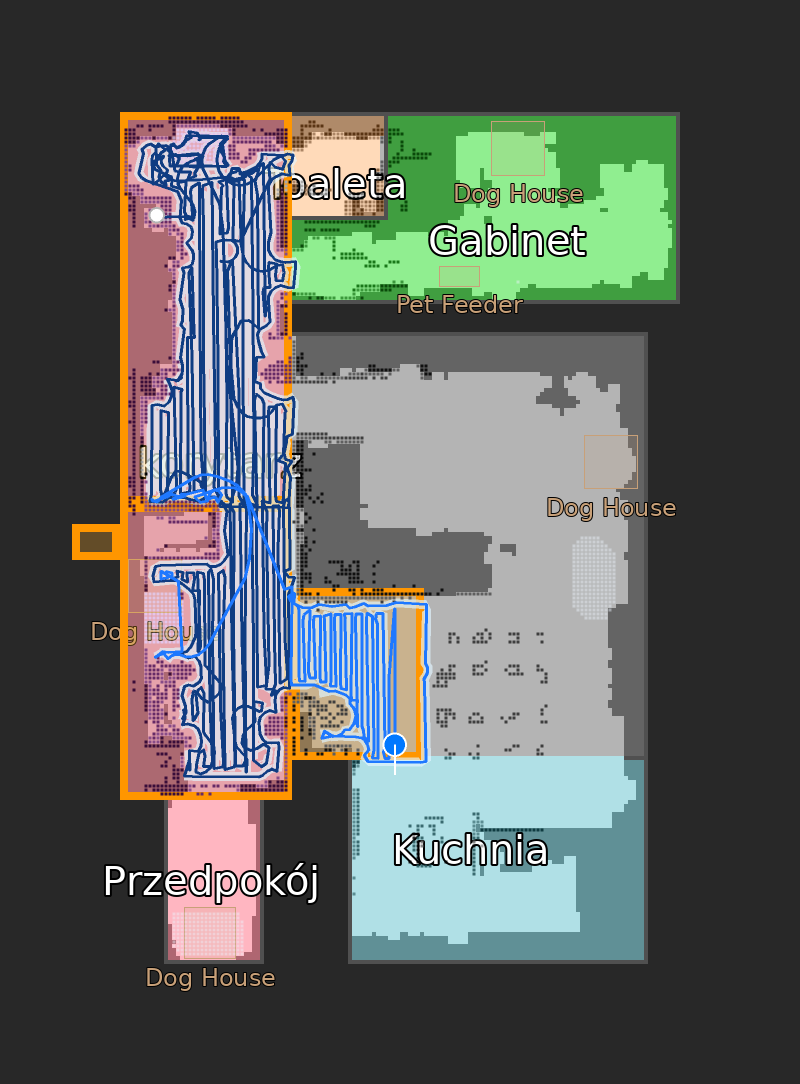
A four-rectangle zone clean of a hallway in progress — amber outlines are the zones sent to the robot, the blue trail and light strips show what it has covered so far. The zones came from the map card's predefined selections, so one tap sends the whole set.
Unconditional task/resume — wakes the robot and resumes the current job even
when the entity state lags behind (e.g. a false "robot lifted" pause on a
doormat). Safe to call anytime; the robot rejects it when there is nothing to
resume.
action: narwal.resume
target:
  entity_id: vacuum.narwal_flow_vacuum
Automation tip: trigger on sensor.*_error changing to robot_lifted, wait
a few seconds, then call narwal.resume — this auto-recovers the common
"robot stuck on a doormat" false alarm.
For an interactive map we recommend Piotr Machowski's
xiaomi-vacuum-map-card
(available in HACS). The HD camera exposes the calibration_points
attribute the card needs; selections arrive in robot world coordinates and feed
narwal.clean_zone / narwal.clean_rooms directly. It also exposes a
rooms attribute, so the card's "Generate rooms config" button builds
the whole Rooms mode for you in one click (see
Generating the Rooms mode automatically):
type: custom:xiaomi-vacuum-map-card
entity: vacuum.narwal_flow_vacuum
map_source:
  camera: camera.narwal_flow_map_hd
calibration_source:
  camera: true
map_modes:
  - name: Rooms
    icon: mdi:floor-plan
    selection_type: ROOM
    service_call_schema:
      service: narwal.clean_rooms
      service_data:
        rooms: "[[selection]]"
        entity_id: "[[entity_id]]"
    predefined_selections:
      - id: "1"
        icon: {name: "mdi:sofa", x: 50, y: -60}
        outline: [[10, -10], [90, -10], [90, -90], [10, -90]]
      # one entry per room; outlines in robot world coordinates
  - name: Zone
    icon: mdi:select-drag
    selection_type: MANUAL_RECTANGLE
    service_call_schema:
      service: narwal.clean_zone
      service_data:
        zone: "[[selection]]"
        entity_id: "[[entity_id]]"
Notes:
- With camera calibration the card scales automatically to whatever
map_scaleyou configure — no re-calibration needed. - The map layer switches (
switch.*_draw_*) pair nicely with the card view — add them as tiles under the map to declutter it on demand.
The HD camera exposes a rooms attribute — per-room outline polygons in
world coordinates, computed live from the robot's map (survives remaps). This
is exactly the format the card's "Generate rooms config" button expects:
- Open the card in the dashboard editor (visual editor).
- Make sure
map_source.camerapoints atcamera.*_map_hd. - Click Generate rooms config — the card fills
predefined_selectionsfor the (last) ROOM-type map mode with every room's outline, name and label anchor. Pair it with aservice_call_schemacallingnarwal.clean_roomswithrooms: "[[selection]]".
⚠️ The button replaces thepredefined_selectionsof your ROOM mode. If you have hand-tuned room outlines, icons or labels, don't click it (or back up your card YAML first).
- Narwal vacuum on the same local network as Home Assistant
- Port 9002 reachable (no firewall blocking)
- Home Assistant 2025.1.0+ / Python 3.12+
- Wake from deep sleep is unreliable — the robot may not respond after long idle periods. Opening the Narwal app briefly (or the wake button) can help.
- Single connection — the robot talks to one WebSocket client at a time. Close the Narwal app before using HA to avoid conflicts.
- Fan speed is set-only — robot doesn't broadcast its current level.
- Map may be stale — robot can return an old map. A new clean cycle typically refreshes it.
- Firmware differences — command payload schemas differ between firmware generations; this fork is validated primarily on Narwal Flow v01.08.03.
| Problem | Solution |
|---|---|
| "Cannot connect" during setup | Verify IP and that port 9002 is reachable. Robot must be powered on. |
| Entities show "Unavailable" | Robot may be asleep. Open the Narwal app briefly (or press the wake button entity). |
| Map not showing | Map loads after robot wakes. A new clean refreshes a stale map. |
| Commands not responding | Close the Narwal app — only one WebSocket connection at a time. |
| Robot paused mid-clean with "robot lifted" error | Call narwal.resume (see Services). |
Start / zone / room clean fails with NOT_READY (code=4) |
The robot declines to start until it has charged — seen right after a long clean (rejected at 23-26% battery, accepted at 30%). Let it charge; a running mop-drying cycle is not what blocks the start. |
| Z10 Ultra disconnects | Re-add the integration with the correct model selected. |
Use the issue templates — they collect your HA version, model, and debug logs for faster diagnosis.
Contributions and testing reports are welcome — see CONTRIBUTING.md.
If you have a non-Flow Narwal model, testing reports are especially valuable.
The tools/ directory contains the reverse-engineering helpers (traffic capture,
WebSocket pcap decoder, payload replay) used to develop this integration.
- sjmotew — author of the original NarwalIntegration this repository is based on
- jgus — v2 CleanParam protocol decoding (upstream PR #49)
- StratoGh0st99 — status field mappings
- ullrik — French translation
This is an unofficial, community-developed integration. It is not affiliated with, endorsed or sponsored by Narwal (Yunjing Intelligence Technology Co., Ltd.). "Narwal" and related product names are trademarks of their respective owners and are used here only to identify compatible devices. The local protocol was reverse-engineered from network traffic and the Narwal mobile application for interoperability purposes.
- Use at your own risk. No warranty.
- No cloud dependency. No external data transmission.
- Firmware updates from Narwal may break this integration at any time.
MIT — original work © 2026 sjmotew, fork contributions © 2026 sytchi.